Preview
Build your website and try everything before you go live.
$0free
Online store for digital products
Describe what you make, from planners to sample packs, and Cornerrr builds a shop for it: product pages with preview images, a Stripe checkout, and files that reach each buyer after payment and stay in their account. Digital downloads come with any paid plan.
Step by step
The spreadsheet you use with clients, the guide you keep explaining by email, the pattern friends keep requesting: a first product that answers a question people already have sells faster than a broad catalog.
Put everything a buyer needs into one PDF, or one ZIP with a short read-me: what’s inside, which apps open it and how to print or install it. Name the files plainly so they still make sense in a downloads folder a year later.
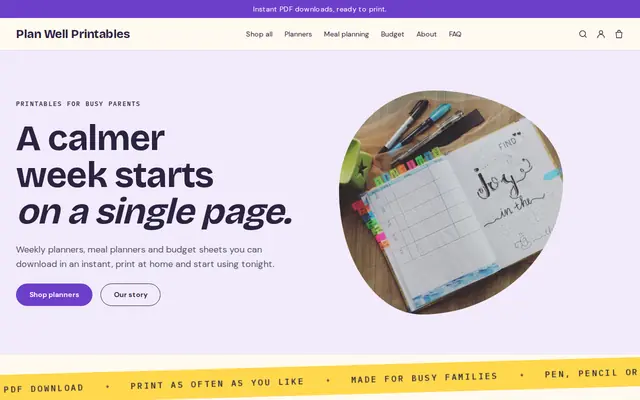
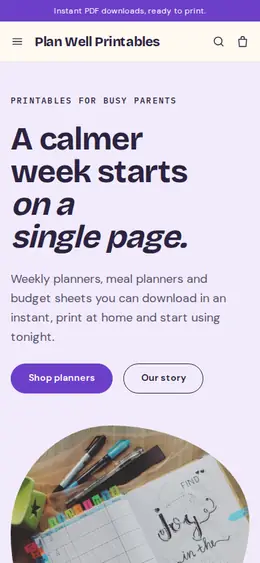
Nobody can hold a download, so show it: page spreads, a screenshot of the spreadsheet filled with sample numbers, a mockup on a phone or a desk. State the file format and the page or file count on every product.
On Cornerrr you set a product to “a download” and attach its files. After payment the order email points buyers to them, and they sign in with a code sent to their email to find every file in their account.
Say plainly whether a file is for personal use, for one business or for client work, and what happens if someone asks for a refund. Cornerrr can draft a refund policy page for you to edit; treat it as a draft, not legal advice.
With three or four products, add a bundle at a lower combined price and a discount code for past buyers. A bundle gives undecided buyers an easy yes and raises the size of each order.
Digital products
Products with photos, options, prices and stock, a cart and a Stripe checkout.
Built in
Attach PDFs, ZIP folders, EPUB ebooks, audio, video or images to a product. Paid orders unlock them, the order email points buyers to them, and they stay in each buyer’s account to download again.
Digital sales are often taxed where the buyer lives. Once Stripe Tax is active on your Stripe account, it calculates sales tax or VAT for each order at checkout.
Sell a printed planner next to its PDF, or a paper pattern next to the download. Products that ship ask for a delivery address; downloads don’t need one.
Upload a mockup image and Cornerrr drafts the product listing, alt text and tags. Then ask the assistant to tighten every description or start a launch-week discount code, and apply what you like.
Ready-made themes
Made for Printables, Templates, Online courses
Bright and tidy for downloads, templates and courses.

Before you start
When you sell downloads to consumers in the EU, VAT is generally charged at the rate of the buyer’s country, and the One-Stop Shop (OSS) lets you report it in one return. Stripe Tax can calculate it; ask an accountant when you need to register.
Consumers there normally have 14 days to cancel an online purchase. For a download, that right can end once the download starts, but only if the buyer expressly agreed to that and acknowledged losing the right before buying. Ask an advisor how to collect that consent.
Some US states tax digital downloads and others don’t, and some treat ebooks, music and software differently. Whether you must register in a state depends on your sales there, so check with an accountant as you grow.
General information to help you get started, not legal advice. Rules differ by country, state and product, so check the ones that apply to you.
How it works
A sentence or two is enough: what you do, who it’s for and how people buy from you.
Cornerrr writes your pages, adds your products or services, and picks the colours, fonts and look. It takes about a minute.
Link a Stripe account, or create one in a few minutes. Your customers pay you directly.
Publish on your free Cornerrr web address, or use your own. Change anything later by asking.
Payments
Payments go through your own Stripe account, straight to you. Your customers see the methods you turn on in Stripe that work for their country and currency.
Selling in Europe or the US? United States, United Kingdom, Germany, France, Netherlands, Ireland and every country we cover.
Pricing
Build and preview for free, no card needed. Every paid plan starts with a 14-day free trial, and Cornerrr adds no transaction fees.
Build your website and try everything before you go live.
$0free
Go live and start selling.
$19a month
Most popular
For growing businesses with subscriptions and deliveries.
$49a month
For several stores and bigger catalogues.
$99a month
Questions
Anything you can deliver as a file: PDFs, ZIP folders, EPUB ebooks, audio, video and images. Templates that live in another app, such as Notion or Canva, can be sold as a PDF that holds the template link.
The order email points them to the product, where they sign in with a code sent to their email and download the files. Everything stays in their account, so a lost email doesn’t turn into a support request.
You can build and preview your shop for free. Going live and selling digital downloads need a paid plan, and Starter is enough for both.
Files are only handed to signed-in buyers with a paid order, but once downloaded a file can be copied like any other. Most sellers rely on a clear license, their name inside the file and fair prices.
No. You describe your business in your own words and Cornerrr builds the website. Afterwards you change things by clicking, or by asking the assistant in plain words.
Building and previewing your website is free, with no card needed. To go live and take payments, choose a plan from $19 a month. Every paid plan starts with a 14-day free trial; a card is needed to start it.
Describe what you sell and see your shop in about a minute. It’s free until you go live.