Preview
Build your website and try everything before you go live.
$0free
Website builder for water delivery businesses
Describe your water round and Cornerrr builds a water delivery website with your bottle plans, dispenser rentals, extra bottles and delivery areas. Stripe bills each plan on its schedule and pays you directly.
What you get
Cornerrr writes every page from your description, then you change anything by clicking or by asking.
Plans like two bottles every week or five every month, each with its own price and billing schedule. Stripe bills them automatically on the Growth plan, and subscribers see their plan in their account.
Rent hot-and-cold coolers as a monthly subscription of their own, or sell them outright as a product with stock tracking, so you never promise a cooler that isn’t in the warehouse.
One-time orders for extra jugs before a party or a heat wave, plus cups, pumps, bottle racks and cleaning kits, with fixed delivery rates you set.
Offices, gyms and schools need more bottles and often an invoice. List office service as price on request: they send headcount, floors and address, and you reply with a quote by email.
Deliveries and subscriptions
Plans billed every week or month by Stripe, with one-off products and extras alongside.
Stripe charges each subscriber when their plan renews, by card, wallet or direct debit where Stripe supports it, so delivery day is for driving, not for collecting money at the door.
Ask the assistant for a Delivery areas page with the towns, zip codes and delivery day of each route. Checkout takes addresses in the countries you choose, so this page is where customers check their street.
Customers can’t change a plan themselves yet. They message you through your website or reply to an email, it lands in your Inbox, and you update the subscription in your Stripe Dashboard.
Cornerrr writes pages about your water, whether it’s spring, purified or mineral, and an FAQ about how bottle exchange works. Ask the assistant to rewrite any of it in plain words.
Ready-made themes
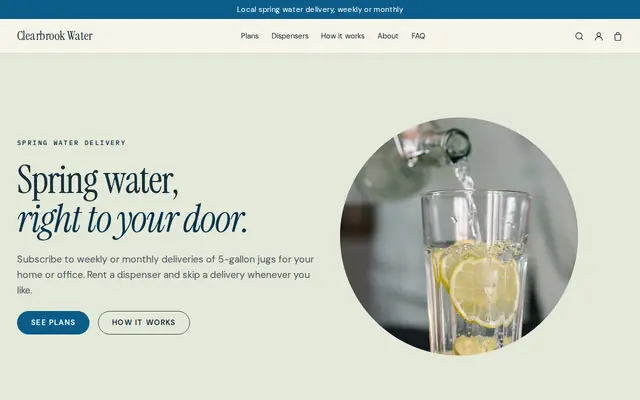
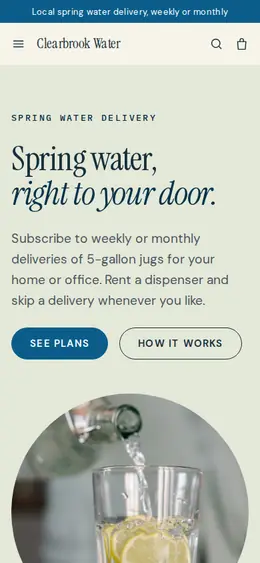
Made for Water delivery, Propane and fuel, Laundry pick-up
Clean and fresh for deliveries on a schedule.
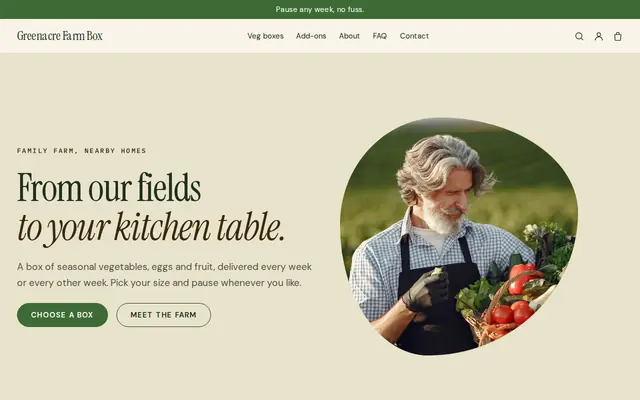
Made for Farm boxes, Meal kits, Local deliveries
Earthy and friendly for farm boxes, meal kits and deliveries that repeat.
Advice
Whatever you build it with, these are the things that turn visitors into customers.
People want two answers first: do you come to my street, and on which day. A simple list of towns or zip codes with their delivery day answers both and saves you a lot of phone calls.
Say how empties work: leave them out on delivery day, how many you take back, whether you charge for the bottles themselves and what happens to them when someone stops. Vague bottle rules cause most arguments.
A subscription is billed as one amount, so build the cost of delivery into each plan instead of adding a separate fee. One clear number per plan is easier to compare with carrying jugs home from the supermarket.
Name the source, how it’s treated and how often it’s tested, and link your quality report if you publish one. In the US bottled water is regulated by the FDA and many states license bottlers too, so check which rules apply to you.
Subscribers contact you to change or stop deliveries, so say exactly how: the form, the email address and the cut-off before the next route. People who can see how to stop are more willing to start.
Most people search “water delivery” with their town name. Put your service towns in your page titles and keep the service area on your Google Business Profile the same as the one on your website.
How it works
A sentence or two is enough: what you do, who it’s for and how people buy from you.
Cornerrr writes your pages, adds your products or services, and picks the colours, fonts and look. It takes about a minute.
Link a Stripe account, or create one in a few minutes. Your customers pay you directly.
Publish on your free Cornerrr web address, or use your own. Change anything later by asking.
Payments
Payments go through your own Stripe account, straight to you. Your customers see the methods you turn on in Stripe that work for their country and currency.
Selling in Europe or the US? United States, United Kingdom, Germany, France, Netherlands, Ireland and every country we cover.
Pricing
Build and preview for free, no card needed. Every paid plan starts with a 14-day free trial, and Cornerrr adds no transaction fees.
Build your website and try everything before you go live.
$0free
Go live and start selling.
$19a month
Most popular
For growing businesses with subscriptions and deliveries.
$49a month
For several stores and bigger catalogues.
$99a month
Questions
Yes. On the Growth plan each bottle plan is a subscription: customers choose one, pay at checkout through your own Stripe account, and Stripe bills them every week or month after that. You get an email for every new order.
Not yet. Customers see their plan in their account, but changes go through you: they send a message or reply to an email, and you change, hold or cancel the subscription in your Stripe Dashboard.
Make the dispenser its own monthly subscription, separate from the water plan, so a customer can rent one without changing their bottles. If you’d rather sell coolers, list them as a regular product with stock.
Checkout limits addresses by country, not by zip code. Put your towns and zip codes on every plan page and on a Delivery areas page, and contact anyone outside your routes before their first delivery.
It depends on where you are: some states and countries treat drinking water as tax-free food, others tax it, and dispenser rentals are often taxed differently again. Ask your tax office or accountant. Stripe Tax can work it out at checkout once you turn it on.
No. You describe your business in your own words and Cornerrr builds the website. Afterwards you change things by clicking, or by asking the assistant in plain words.
Building and previewing your website is free, with no card needed. To go live and take payments, choose a plan from $19 a month. Every paid plan starts with a 14-day free trial; a card is needed to start it.
Describe your business and see your website in about a minute. It’s free until you go live.