Preview
Build your website and try everything before you go live.
$0free
Online store for clothing
Tell Cornerrr about your label and it builds a clothing shop around it: collections, products with sizes and colors that each keep their own stock, a size guide page, a returns page and a Stripe checkout. Payments go straight to you.

Step by step
Launch with the pieces you can restock or remake, not everything you have ever designed. A dozen styles in a few colors is far easier to photograph, describe and keep in stock than forty.
Each style is one product, with size and color as options and stock for every combination. A shopper picks the black in a medium on one page, and checkout stops when that exact size runs out.
Photograph every piece worn, from the front, back and side, plus a flat-lay that shows the shape and a close-up of the fabric. Write the model’s height and the size they wear under the photos, because that one line answers most fit questions.
Measure your finished garments, not the pattern: chest, waist, hip, length and sleeve, in inches and centimeters. Put the table on its own page, link it from every product and explain how to measure a favorite piece at home to compare.
Fiber content, where it was made and how to wash it, in the same order on each page. Shoppers can’t touch the fabric, so these lines do the work a fitting room would.
Say how long people have to return or exchange, who pays the return postage and what condition items must be in. Cornerrr can draft a refund policy page for you to read and adjust; it’s a starting point, not legal advice.
Clothing and accessories
Products with photos, options, prices and stock, a cart and a Stripe checkout.
Built in
Each combination of size and color has its own stock count and SKU. Stock goes down when an order is paid, so the medium in sage can sell out while the large stays on sale.
Add a size guide, a returns and exchanges page or any other page you need, and edit it by clicking. The AI can draft your refund and shipping policy pages, so you start from words instead of a blank page.
Upload a photo of a new piece and Cornerrr writes a first draft of the listing, with alt text and tags. You add the fabric, the fit notes and the measurements you know best.
Ask the assistant to add your fall collection, lower the prices of last season’s pieces or create a launch discount code with an end date, then apply each change with a click or undo it.
Ready-made themes
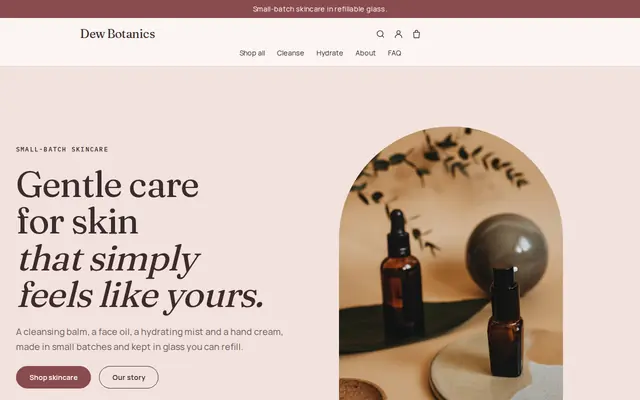
Made for Skincare, Bath and body, Natural beauty
Soft and minimal for skincare, candles and self-care brands.

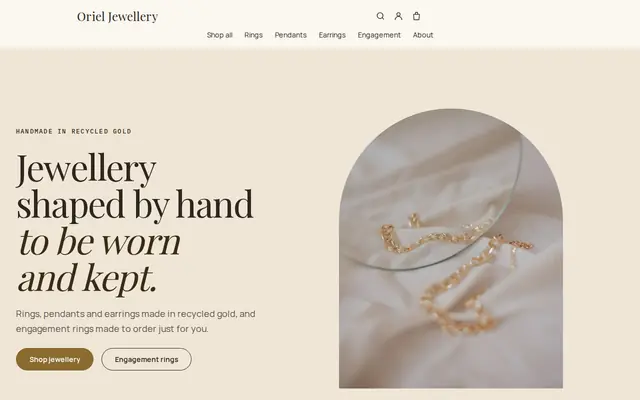
Made for Jewellers, Watchmakers, Luxury goods
Refined and luxurious for jewellery and premium goods.
Before you start
In the US, the FTC’s textile rules ask for fiber content and country of origin on garment labels and in online listings, and a care label on most clothing. In the EU and UK, fiber composition must be shown before purchase, including online. Check what applies to your pieces.
Customers in the EU and UK who buy online can usually cancel within 14 days of receiving their order, for any reason. Your returns page should explain how to send things back and when the refund is made.
Several US states, such as Pennsylvania and New Jersey, exempt most clothing from sales tax, and the UK zero-rates children’s clothing. Stripe Tax can work out sales tax and VAT at checkout on a paid plan; ask an accountant how your pieces are treated.
Count fabric, trims, labels, making, packaging and your own hours, then leave room for returns, which are common in clothing. A price that only works if nothing ever comes back won’t last a season.
General information to help you get started, not legal advice. Rules differ by country, state and product, so check the ones that apply to you.
How it works
A sentence or two is enough: what you do, who it’s for and how people buy from you.
Cornerrr writes your pages, adds your products or services, and picks the colours, fonts and look. It takes about a minute.
Link a Stripe account, or create one in a few minutes. Your customers pay you directly.
Publish on your free Cornerrr web address, or use your own. Change anything later by asking.
Payments
Payments go through your own Stripe account, straight to you. Your customers see the methods you turn on in Stripe that work for their country and currency.
Selling in Europe or the US? United States, United Kingdom, Germany, France, Netherlands, Ireland and every country we cover.
Pricing
Build and preview for free, no card needed. Every paid plan starts with a 14-day free trial, and Cornerrr adds no transaction fees.
Build your website and try everything before you go live.
$0free
Go live and start selling.
$19a month
Most popular
For growing businesses with subscriptions and deliveries.
$49a month
For several stores and bigger catalogues.
$99a month
Questions
Lay each finished garment flat and measure across the chest just below the armholes, across the waist and hips, and from the highest point of the shoulder to the hem. Double the flat chest and waist for the full circumference, and measure two or three pieces per size to catch small differences.
Many shops ask the customer to send the item back and order the new size, which keeps stock counts honest. On Cornerrr, when you refund the return the customer gets a refund email, and the new size goes through checkout like any order.
Yes. Set the stock to what you have, even one or two, and checkout stops once they’re sold. If you’d rather take orders first and then make them, turn on “sell when out of stock” and write the making time on the product page.
Yes. Add a wholesale page with the price hidden and a request form. Boutiques send the styles and quantities they want, the request lands in your Inbox, and you answer by email with your line sheet and terms.
No. You describe your business in your own words and Cornerrr builds the website. Afterwards you change things by clicking, or by asking the assistant in plain words.
Building and previewing your website is free, with no card needed. To go live and take payments, choose a plan from $19 a month. Every paid plan starts with a 14-day free trial; a card is needed to start it.
Describe what you sell and see your shop in about a minute. It’s free until you go live.