Preview
Build your website and try everything before you go live.
$0free
Website builder for hair salons
Describe your salon in a sentence or two and Cornerrr builds the pages: your services and prices by stylist, a color consultation request, your retail shelf and how to find you. Clients ask for an appointment and you confirm it by email.

What you get
Cornerrr writes every page from your description, then you change anything by clicking or by asking.
Cuts, blow-dries, color and treatments on one clear menu, with how long each takes and where prices change between a junior and a senior stylist, so clients know what to ask for before they get in touch.
Clients choose a service and say which days and times suit them. The request lands in your Inbox and your email, and you reply to confirm the time that works for your column.
Balayage, big changes and color corrections listed as “price on request”, so clients describe their hair now and the look they want, and you quote after a consultation instead of guessing online.
The shampoos, masks and styling products on your shelf as products with photos, sizes and stock, paid online through Stripe and shipped at the fixed rates you set.
Beauty and wellbeing
Your services with prices, or “price on request” so clients ask first, and every request in your Inbox.
Every appointment request arrives in your Inbox and by email with the client’s name, the service and their message. Ask the assistant what came in this week, then reply in your own words.
Add a page for every stylist with their specialties and photos of their work, and edit it by clicking whenever someone joins the team or moves up a level.
Each product has sizes, stock and photos. Checkout stops when a size sells out, so you never take an online order for a bottle you don’t have.
Most salon searches happen on a phone. Every Cornerrr website works on phones and carries the page titles, descriptions and business details that search engines read.
Ready-made themes
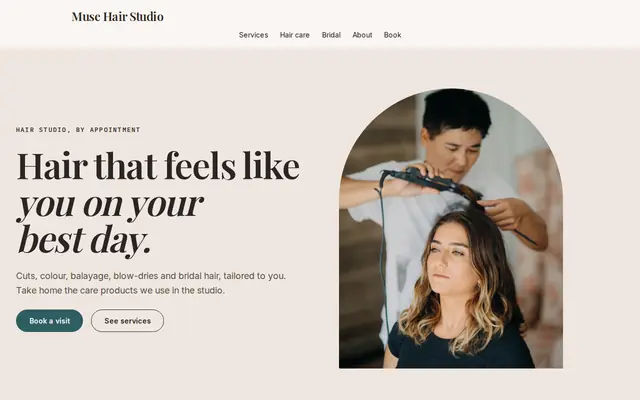
Made for Hair salons, Nail studios, Beauty rooms
Chic and friendly for salons that take bookings.
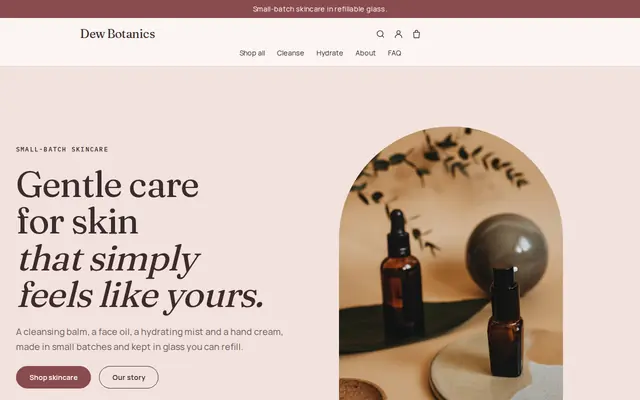
Made for Skincare, Bath and body, Natural beauty
Soft and minimal for skincare, candles and self-care brands.
Advice
Whatever you build it with, these are the things that turn visitors into customers.
Real color work shot in daylight, from the back and the side, says more than stock photos of models. Ask permission, crop out faces if clients prefer, and change the first photo every season.
If a price depends on length, thickness or stylist level, say so next to the service and show a starting price. Clients who understand why a price varies are rarely surprised at the desk.
Most hair color makers tell salons to do a skin allergy test 48 hours before color. Say on the color page that new color clients need one and how to come in for it, so first appointments don’t get pushed back.
Write down how far ahead clients should ask for Saturdays and the holiday season, and how much notice you need to move an appointment. One clear line on the contact page saves a lot of back and forth.
New clients worry about finding you. Add a photo of the salon from the street, the nearest parking or transit stop and your opening hours, and link the website from your Google Business Profile.
How it works
A sentence or two is enough: what you do, who it’s for and how people buy from you.
Cornerrr writes your pages, adds your products or services, and picks the colours, fonts and look. It takes about a minute.
Link a Stripe account, or create one in a few minutes. Your customers pay you directly.
Publish on your free Cornerrr web address, or use your own. Change anything later by asking.
Payments
Payments go through your own Stripe account, straight to you. Your customers see the methods you turn on in Stripe that work for their country and currency.
Selling in Europe or the US? United States, United Kingdom, Germany, France, Netherlands, Ireland and every country we cover.
Pricing
Build and preview for free, no card needed. Every paid plan starts with a 14-day free trial, and Cornerrr adds no transaction fees.
Build your website and try everything before you go live.
$0free
Go live and start selling.
$19a month
Most popular
For growing businesses with subscriptions and deliveries.
$49a month
For several stores and bigger catalogues.
$99a month
Questions
Clients send an appointment request with the service and the days that suit them. It lands in your Inbox and by email, and you confirm the time by reply. There’s no booking calendar, so nothing lands in a gap you meant to keep free.
Yes. Add the shampoos and styling products you stock with photos, sizes and stock levels. Customers pay through your own Stripe account, and you ship orders at the rates you set.
Most clients look for prices before they get in touch, so show at least a starting price for each service. For color corrections and big changes, use “price on request” and quote after a consultation.
Yes. Add a page for each stylist with their specialties and photos of their work, and link to it from your services. You can rename, move or remove pages any time by clicking.
No. You describe your business in your own words and Cornerrr builds the website. Afterwards you change things by clicking, or by asking the assistant in plain words.
Building and previewing your website is free, with no card needed. To go live and take payments, choose a plan from $19 a month. Every paid plan starts with a 14-day free trial; a card is needed to start it.
Describe your business and see your website in about a minute. It’s free until you go live.