Preview
Build your website and try everything before you go live.
$0free
Website builder for nutritionists and dietitians
Describe your practice, the people you help and your credentials, and Cornerrr builds the website: services, consultation requests, programs as packages, a monthly check-in plan on the Growth plan and recipe guides as downloads.

What you get
Cornerrr writes every page from your description, then you change anything by clicking or by asking.
A short form for a name, email, phone and an optional note. It lands in your Inbox and by email; food diaries and health details wait for the first session.
A first assessment and two follow-ups as one product, with its price and what’s included, paid at checkout through your own Stripe account.
Ongoing support billed monthly by Stripe on the Growth plan. Clients see their plan in their account, and you explain plainly how check-ins work.
PDF guides, shopping lists and recipe collections as digital downloads on any paid plan, delivered after payment and saved in the buyer’s account.
Care and health
Your services with prices, or “price on request” so clients ask first, and every request in your Inbox.
Upload a guide once and every buyer gets it after payment, with a copy kept in their account to download again later.
Cornerrr writes friendly pages about how you work. Ask the assistant to remove anything that sounds like a promise about weight or health, or to explain your approach without jargon.
Packages and guides are paid at checkout, plans renew through Stripe Billing, and the money goes to your own Stripe account. Cornerrr adds no transaction fee.
On the Growth plan, publish recipes and articles on your website’s blog, with a search title and description for each post.
Ready-made themes
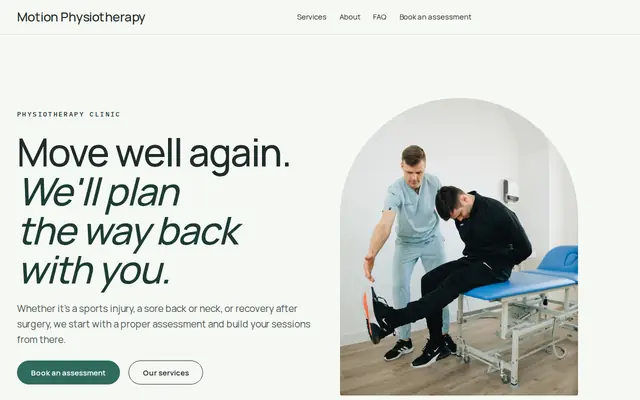
Made for Physiotherapists, Chiropractors, Massage therapists
Fresh and professional for therapists and health practices.
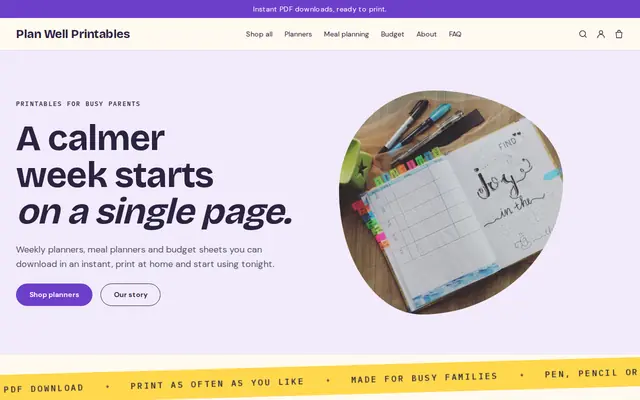
Made for Printables, Templates, Online courses
Bright and tidy for downloads, templates and courses.
Advice
Whatever you build it with, these are the things that turn visitors into customers.
“Dietitian” is a protected title in the UK, and many US states license dietitians or nutrition practice. “Nutritionist” is less regulated in some places, so use the title you actually hold and name who credentialed you.
Avoid promising weight loss amounts or health outcomes. Describe how you work, what a session covers and who you help. Health claims are closely regulated, and honest words attract better-matched clients.
In the US, some insurance plans cover nutrition counseling from a registered dietitian, sometimes with a doctor’s referral. Say whether you’re in network or can provide paperwork, and suggest clients check their plan.
Use your own photos of real meals, your recipes and your kitchen rather than stock salads. It shows your style and makes your guides feel worth buying.
Sports nutrition, family meals, digestive health or plant-based eating: a clear focus gives your home page its first line and helps the right people decide quickly.
How it works
A sentence or two is enough: what you do, who it’s for and how people buy from you.
Cornerrr writes your pages, adds your products or services, and picks the colours, fonts and look. It takes about a minute.
Link a Stripe account, or create one in a few minutes. Your customers pay you directly.
Publish on your free Cornerrr web address, or use your own. Change anything later by asking.
Payments
Payments go through your own Stripe account, straight to you. Your customers see the methods you turn on in Stripe that work for their country and currency.
Selling in Europe or the US? United States, United Kingdom, Germany, France, Netherlands, Ireland and every country we cover.
Pricing
Build and preview for free, no card needed. Every paid plan starts with a 14-day free trial, and Cornerrr adds no transaction fees.
Build your website and try everything before you go live.
$0free
Go live and start selling.
$19a month
Most popular
For growing businesses with subscriptions and deliveries.
$49a month
For several stores and bigger catalogues.
$99a month
Questions
Who you help, your credentials, how sessions work, your fees or packages, whether you take insurance and how to request an intro call. Cornerrr builds a first version from a short description of your practice.
Yes. General meal-planning guides and recipe books can be digital downloads on any paid plan. Personalized plans for medical needs are better delivered within your sessions, under your professional rules.
Yes. On the Growth plan, a monthly plan is a Stripe subscription, billed automatically, which clients see in their account. They can’t pause or change it themselves yet, so they ask you.
No. Ask for contact details and an optional short note, and gather health history, food diaries and lab results within your practice’s own systems.
No. You describe your business in your own words and Cornerrr builds the website. Afterwards you change things by clicking, or by asking the assistant in plain words.
Building and previewing your website is free, with no card needed. To go live and take payments, choose a plan from $19 a month. Every paid plan starts with a 14-day free trial; a card is needed to start it.
Describe your business and see your website in about a minute. It’s free until you go live.