Creative and digital · Riso
Riso, an art print shop website template in layered color
Only 50 of each: Riso is an art print shop website template for a small studio printing limited editions of plant and city scene prints in A4 and A3, with FAQ answers on how risograph printing works. Start with it under your studio’s name.
- Free to build and preview
- Payments by Stripe
- No transaction fees from Cornerrr

About this theme
Riso Graphic and colourful for artists and print shops.
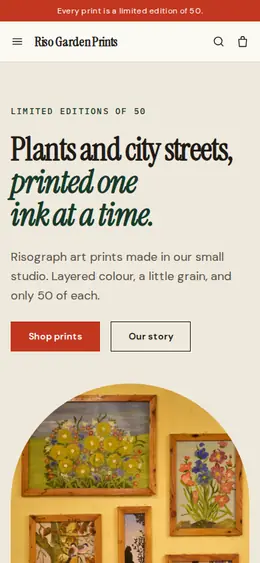
Riso suits artists, illustrators and small galleries selling prints. Bright inks on off-white, square buttons and a clean grid make it graphic and colorful, so the prints are the color on the page. It gives buyers a reason to buy now: “limited edition of 50” runs through the announcement bar, the hero and every product, and the story explains why no two prints come out exactly alike, which turns small differences into charm.
- Made for
- Art prints, Illustrators, Galleries
- Feel
- Expressive: bold type and color
- Comes with
- 4 pages, 6 sample products
- Mood
- playful, inky, colourful, handmade, curated
- background
- foreground
- primary
- accent
- muted
What’s inside
Every page, already written.
Home
A hero with a drawn sprig, a strip of “layered inks, edition of 50”, two ways to fill a wall (plants, city), newest editions, how you print, a statement and a sign-up for new editions.
About
The studio, the risograph and why each design stops at 50 copies, with a link to the shop.
FAQ
What a risograph print is, what an edition of 50 means, color differences and order tracking. Add paper weight, framing and how prints are packed.
Contact
A message form for questions about an order or a print. Messages show up in your Inbox and email.
How it works
From a few words to your own Riso website, live.
Step 1: Describe your business
A sentence or two is enough: what you do, who it’s for and how people buy from you.
Step 2: We build it while you watch
Cornerrr writes your pages, adds your products or services, and picks the colours, fonts and look. It takes about a minute.
Step 3: Connect payments
Link a Stripe account, or create one in a few minutes. Your customers pay you directly.
Step 4: You’re live
Publish on your free Cornerrr web address, or use your own. Change anything later by asking.
Questions
Good to know
How do I stop Riso selling more than 50 prints?
Set stock for each print, split across A4 and A3 as you like, and checkout stops when it reaches zero. Stock goes down only when an order is paid, so the edition count stays honest.
Can I use Riso for original paintings?
Yes. Set each painting’s stock to one, remove the size option, and give the medium and dimensions in the description. For commissions, add an item marked price on request.
Can I change Riso’s colors to match my inks?
Yes. Ask the assistant for something like “fluorescent pink and teal on cream”, or set the colors yourself after you start; your prints and pages stay put.
Riso suits
- Artist website builder
- Illustrator website builder
- Art gallery website builder
- Print shop website builder
- Screen printing shop website builder
- Nail salon website builder
- Tattoo studio website builder
- Hair braiding salon website builder
- Art classes website builder
Selling with Riso
More themes for creative and digital
- Plan WellPrintables, Templates, Online courses
- Golden HourPhotographers, Videographers, Event planners
Make Riso yours.
Start with this theme and Cornerrr builds your website from it with your own name. Free until you go live.