Preview
Build your website and try everything before you go live.
$0free
Online store for subscriptions
Describe what you sell on repeat and Cornerrr builds the website and the plans: subscriptions billed by Stripe every week, month or year, optional free trial days, and an account where subscribers see what they’re paying for.


Step by step
A box, a refill, a service visit, a weekly class or time with you. Write one sentence on what arrives or happens each period, because that sentence is the product people subscribe to.
Stripe can bill every day, week, month or year, or every few of them, like every two weeks or every three months. Match it to how often you really deliver, not to what sounds best.
Free trial days suit service plans where nothing ships. For physical boxes, a single box to try first is usually safer than a free trial that sends real goods for nothing.
Say what each period includes, when the next charge happens, how to cancel and what happens to an order already being packed. Clear terms prevent disputes, and many places require them.
Subscribers see their plans in their account, but changes like a new size or a cancellation go through you today. Add a short request form for changes and answer it from your Inbox.
Some buyers want to try before they commit. Selling the same box once, at a slightly higher price than the subscription, gives them a way in and shows what the plan saves.
Ways to sell
Plans billed every week or month by Stripe, with one-off products and extras alongside.
Built in
On the Growth plan, each subscription is billed by Stripe Billing at the interval you choose, with optional free trial days. Payments go straight to your own Stripe account.
Customers sign in with a code sent by email, with no passwords, and see their subscriptions, orders and addresses in one place.
Subscriptions take cards, wallets like Apple Pay and Google Pay, and direct debits such as SEPA, ACH or Bacs where Stripe offers them for your country, plus a few others.
Subscriptions and ordinary products sit in the same shop, so a single trial box, add-ons and gifts can live next to the plan they lead to.
Ready-made themes
Made for Farm boxes, Meal kits, Local deliveries
Earthy and friendly for farm boxes, meal kits and deliveries that repeat.
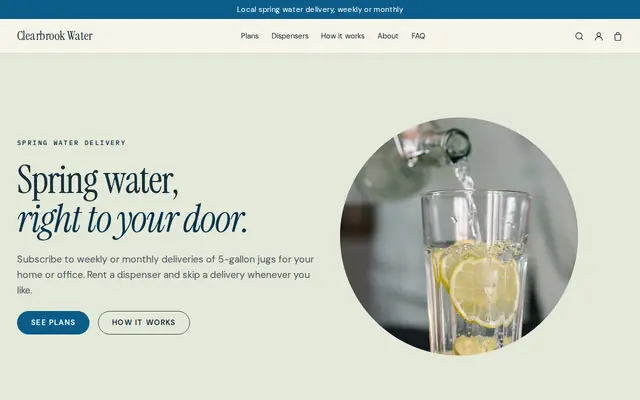
Made for Water delivery, Propane and fuel, Laundry pick-up
Clean and fresh for deliveries on a schedule.

Made for Yoga studios, Pilates, Meditation
Serene and spacious for studios with classes and memberships.
Before you start
Many places have rules for subscriptions that renew on their own. California and several other US states require clear terms before purchase and an easy way to cancel, and Germany requires a cancellation button for consumer contracts made online. Check what applies to you.
Subscribers see their subscriptions in their account but can’t change or cancel them there yet. Give them a clear way to ask, like a cancellation form, answer quickly, and make the change in your Stripe Dashboard. Check that this meets your local rules.
Stripe bills each subscriber on the date they signed up, so renewals spread across the month. Many box businesses still ship on one fixed day; say which on the plan page so subscribers know when to expect it.
General information to help you get started, not legal advice. Rules differ by country, state and product, so check the ones that apply to you.
How it works
A sentence or two is enough: what you do, who it’s for and how people buy from you.
Cornerrr writes your pages, adds your products or services, and picks the colours, fonts and look. It takes about a minute.
Link a Stripe account, or create one in a few minutes. Your customers pay you directly.
Publish on your free Cornerrr web address, or use your own. Change anything later by asking.
Payments
Payments go through your own Stripe account, straight to you. Your customers see the methods you turn on in Stripe that work for their country and currency.
Selling in Europe or the US? United States, United Kingdom, Germany, France, Netherlands, Ireland and every country we cover.
Pricing
Build and preview for free, no card needed. Every paid plan starts with a 14-day free trial, and Cornerrr adds no transaction fees.
Build your website and try everything before you go live.
$0free
Go live and start selling.
$19a month
Most popular
For growing businesses with subscriptions and deliveries.
$49a month
For several stores and bigger catalogues.
$99a month
Questions
Subscriptions need the Growth plan. You can build and preview the website for free first, then connect your Stripe account and choose Growth when you’re ready to take subscribers.
Yes. Add free trial days to a subscription and Stripe starts charging when the trial ends. Say on the plan page when the first charge happens, so nobody is surprised.
Not yet. They see their subscriptions in their account, and for changes they contact you; you update or cancel the subscription in your Stripe Dashboard. A short request form makes this easy for both of you.
Anything that repeats on a schedule: a monthly box, a weekly delivery, a refill, a service visit, a class plan or a retainer. If you can say what happens each period, it can be a plan.
No. You describe your business in your own words and Cornerrr builds the website. Afterwards you change things by clicking, or by asking the assistant in plain words.
Building and previewing your website is free, with no card needed. To go live and take payments, choose a plan from $19 a month. Every paid plan starts with a 14-day free trial; a card is needed to start it.
Describe what you sell and see your shop in about a minute. It’s free until you go live.