Creative and digital · Plan Well
Plan Well, a digital products website template for printables
Plan Well is a digital products website template for a printables shop: weekly family planners, meal planners and budget sheets sold as PDF downloads, delivered to buyers after payment. Start with it under your shop’s name and upload your own files.
- Free to build and preview
- Payments by Stripe
- No transaction fees from Cornerrr
About this theme
Plan Well Bright and tidy for downloads, templates and courses.
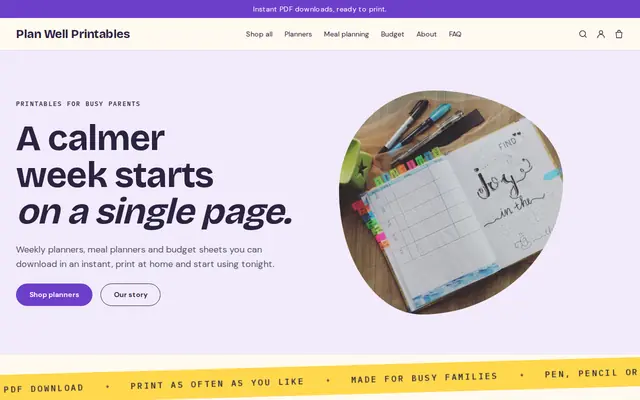
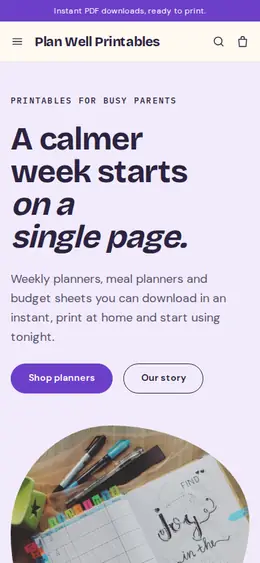
Plan Well suits sellers of printables, templates and course workbooks whose products are files. Violet, sunny yellow and a characterful sans-serif make it friendly, organized and a little playful. It answers the buyer’s practical questions before checkout: the announcement bar says “Instant PDF downloads, ready to print”, the strip mentions pen, pencil or tablet, and the home page FAQ explains downloading, printing at home and writing on a tablet. Selling downloads needs any paid plan.
- Made for
- Printables, Templates, Online courses
- Feel
- Expressive: bold type and color
- Comes with
- 4 pages, 6 sample products
- Mood
- friendly, organised, playful, encouraging
- background
- foreground
- primary
- accent
- muted
What’s inside
Every page, already written.
Home
A hero with a drawn parcel, a strip of “instant PDF download”, three planning styles (the schedule, the dinners, the money), new downloads, why you make them, a statement and three answers about getting and printing files.
About
Who the planners are for and how they’re delivered, with a button to the shop.
FAQ
Downloading, printing, using a tablet, and the fact that nothing is shipped. Add your personal-use terms and what to do if a download doesn’t open.
Contact
A message form for download trouble and planner questions, which arrives in your Inbox and email.
How it works
From a few words to your own Plan Well website, live.
Step 1: Describe your business
A sentence or two is enough: what you do, who it’s for and how people buy from you.
Step 2: We build it while you watch
Cornerrr writes your pages, adds your products or services, and picks the colours, fonts and look. It takes about a minute.
Step 3: Connect payments
Link a Stripe account, or create one in a few minutes. Your customers pay you directly.
Step 4: You’re live
Publish on your free Cornerrr web address, or use your own. Change anything later by asking.
Questions
Good to know
How do buyers get their files on Plan Well?
After payment, Cornerrr delivers the files you uploaded, and buyers also find them in their account, which they sign in to with a code sent by email. Selling digital downloads needs any paid plan.
Can I sell courses with Plan Well?
You can sell course materials as downloads, such as workbooks, slides or video files, but there’s no lesson viewer or members’ area. If your course lives on another platform, link to it from the product page.
Can I stop my printables from being shared?
Cornerrr delivers each file as it is, without locks. Put your terms, such as personal use only, on every product page and inside the PDF itself.
Plan Well suits
- Online course creator website builder
- Author website builder
- Illustrator website builder
- Tutoring business website builder
- Stationery store website builder
- Life coach website builder
- Nutritionist website builder
- Online fitness coach website builder
- Bookkeeper website builder
Selling with Plan Well
More themes for creative and digital
All 33 themesMake Plan Well yours.
Start with this theme and Cornerrr builds your website from it with your own name. Free until you go live.