Preview
Build your website and try everything before you go live.
$0free
Website builder for coffee roasters
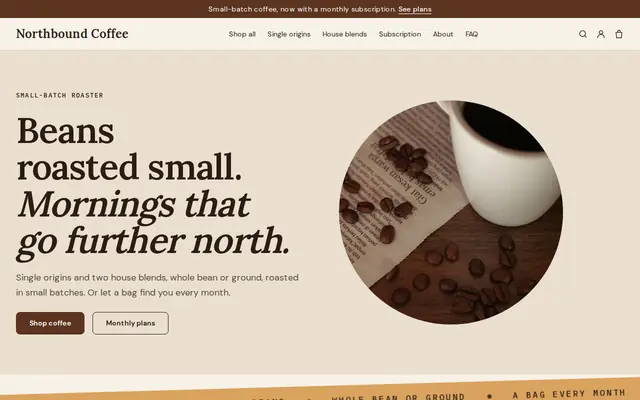
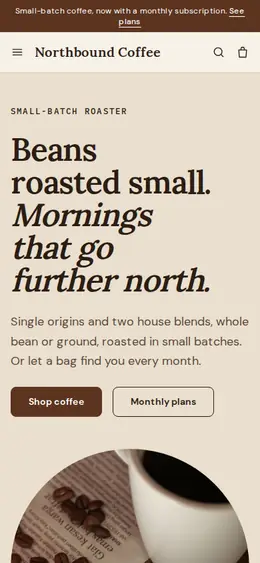
Describe your roastery and Cornerrr builds a coffee roaster website with a product for each coffee, grind and bag size as options, subscriptions on the Growth plan and a wholesale request form for cafés and offices.
What you get
Cornerrr writes every page from your description, then you change anything by clicking or by asking.
Origin, farm or co-op, process, altitude and tasting notes on every product, with whole bean or ground and bag size as options and stock for each.
A bag every week, every two weeks or every month, billed automatically by Stripe on the Growth plan, so each roast day starts with orders you can count on.
Large bags and regular supply listed as “price on request”. Cafés send their volume and brewing setup through a form, and you reply with your trade prices by email.
Drippers, filters, a three-coffee sampler or a gift box as products, shipped with your fixed rates alongside the beans.
Food and drink
Products with photos, options, prices and stock, a cart and a Stripe checkout.
Whole bean, espresso, filter or French press as options on each coffee. Checkout stops when a roast sells out, so a small lot never oversells.
Once Stripe Tax is active on your Stripe account, it calculates sales tax or VAT on each order, and business buyers can enter a tax ID.
Add the carrier and tracking number to an order and your customer gets a shipping email with a link to follow the parcel. UPS, USPS, FedEx, DHL and Royal Mail links are built in.
On the Growth plan you can publish brew guides and origin stories as blog posts, which give search engines more to read and customers a reason to come back.
Ready-made themes
Made for Coffee roasters, Tea shops, Cafés
Bold and modern for roasters, coffee shops and tea sellers.
Advice
Whatever you build it with, these are the things that turn visitors into customers.
Coffee buyers care about freshness. Say which days you roast, how soon after roasting a bag goes out, and print the roast date on every bag.
Pair your cupping notes with simple ones: chocolatey, fruity, bright, smooth. Beginners buy from words they recognize, while enthusiasts read the process and the origin.
A one-line guide next to the option (fine for espresso, medium for filter, coarse for French press) saves complaints from people who bought the wrong grind for their brewer.
A subscription only works if every shipment covers coffee, bag, postage and your time. Work out the margin at your highest shipping rate before you launch it.
If you buy direct or through a specialty importer, name the farm or co-op and add a photo. Specialty buyers look for traceability, and it sets you apart from supermarket bags.
How it works
A sentence or two is enough: what you do, who it’s for and how people buy from you.
Cornerrr writes your pages, adds your products or services, and picks the colours, fonts and look. It takes about a minute.
Link a Stripe account, or create one in a few minutes. Your customers pay you directly.
Publish on your free Cornerrr web address, or use your own. Change anything later by asking.
Payments
Payments go through your own Stripe account, straight to you. Your customers see the methods you turn on in Stripe that work for their country and currency.
Selling in Europe or the US? United States, United Kingdom, Germany, France, Netherlands, Ireland and every country we cover.
Pricing
Build and preview for free, no card needed. Every paid plan starts with a 14-day free trial, and Cornerrr adds no transaction fees.
Build your website and try everything before you go live.
$0free
Go live and start selling.
$19a month
Most popular
For growing businesses with subscriptions and deliveries.
$49a month
For several stores and bigger catalogues.
$99a month
Questions
Yes, on the Growth plan. Stripe charges each subscriber on the schedule you set, such as every two weeks, and they can see their subscription in their account.
As options on one product per coffee, rather than separate products. Each option can have its own price and stock, which keeps your shop tidy and your counts right.
Yes. Add a wholesale product as “price on request”. Cafés send their volumes through a form, the request lands in your Inbox, and you agree prices by email. A discount code can cover repeat trade orders.
It depends on where you and your buyers are, and food and drink often have their own rates. Stripe Tax can calculate it at checkout once it’s active on your Stripe account, but check your obligations with an accountant.
No. You describe your business in your own words and Cornerrr builds the website. Afterwards you change things by clicking, or by asking the assistant in plain words.
Building and previewing your website is free, with no card needed. To go live and take payments, choose a plan from $19 a month. Every paid plan starts with a 14-day free trial; a card is needed to start it.
Describe your business and see your website in about a minute. It’s free until you go live.