Preview
Build your website and try everything before you go live.
$0free
Website builder for farm box and CSA farms
Describe your CSA or farm box and Cornerrr builds a CSA farm website with season shares, weekly or every-other-week boxes billed on the Growth plan, add-ons like eggs and bread, and a page for this week’s harvest.
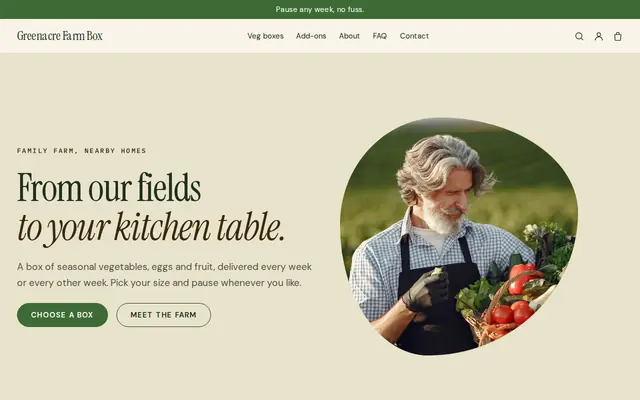
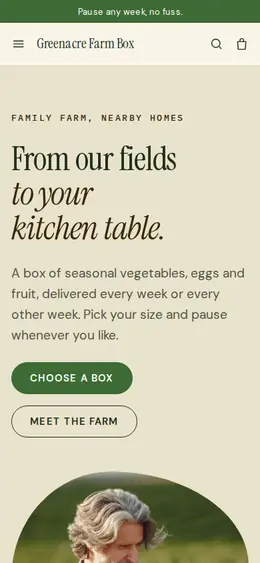
What you get
Cornerrr writes every page from your description, then you change anything by clicking or by asking.
Full and half shares sold once for the season, with share size as an option and stock that matches how many members your fields can feed.
A box billed every week or every two weeks by Stripe on the Growth plan, for members who’d rather pay as they go than upfront. They see their subscription in their account.
Eggs, bread, flowers or a fruit share as separate products, so members can add them without you building a new share for every combination.
Chefs and small grocers ask for standing orders through a request form, and you agree volumes and prices by email when you know what the field will give.
Food and drink
Plans billed every week or month by Stripe, with one-off products and extras alongside.
Stripe Billing charges each box subscriber on the schedule you set, so payments come in without invoices to send in the middle of harvest.
Set how many full and half shares you can grow for, and checkout stops when they’re gone. Nobody pays for a share your fields can’t fill.
Tell the assistant what you picked and it rewrites the “This week’s box” page in plain words for you to apply. Members check it to plan their meals.
Add your drop-off points as an option on each season share, so every order shows where the box goes, and list their days and times on the How it works page.
Ready-made themes
Made for Farm boxes, Meal kits, Local deliveries
Earthy and friendly for farm boxes, meal kits and deliveries that repeat.
Advice
Whatever you build it with, these are the things that turn visitors into customers.
Many CSA members sign up in late winter and early spring. Open sign-ups early, say how many shares are left, and put the start date and the number of weeks on the home page.
New members want to know what they’ll get. Photograph a box from early, mid and late season and list what was in it, so expectations match the harvest.
Say that a CSA shares the farm’s good and bad weeks, and what happens after a hailstorm or a slow spring. Members who knew the deal stay for years; surprised ones don’t renew.
Delivery or drop-off day, times, where boxes are left, what happens if a member is away, and whether to return boxes. Most member emails are about exactly these.
People search for “CSA near me” or “vegetable box delivery” with their town. Use your town and the places you deliver to in your page titles and descriptions.
How it works
A sentence or two is enough: what you do, who it’s for and how people buy from you.
Cornerrr writes your pages, adds your products or services, and picks the colours, fonts and look. It takes about a minute.
Link a Stripe account, or create one in a few minutes. Your customers pay you directly.
Publish on your free Cornerrr web address, or use your own. Change anything later by asking.
Payments
Payments go through your own Stripe account, straight to you. Your customers see the methods you turn on in Stripe that work for their country and currency.
Selling in Europe or the US? United States, United Kingdom, Germany, France, Netherlands, Ireland and every country we cover.
Pricing
Build and preview for free, no card needed. Every paid plan starts with a 14-day free trial, and Cornerrr adds no transaction fees.
Build your website and try everything before you go live.
$0free
Go live and start selling.
$19a month
Most popular
For growing businesses with subscriptions and deliveries.
$49a month
For several stores and bigger catalogues.
$99a month
Questions
Yes. Sell season shares as products with full and half sizes as options and limited stock, or run weekly boxes as subscriptions on the Growth plan. Payments go to your own Stripe account.
A CSA usually means members pay upfront for a season and share the harvest, while a farm box is often a weekly subscription people join at any time. Cornerrr handles both: season shares as products and boxes as subscriptions.
Not yet. Members can see their subscription in their account, and changes go through you by email. Say on your How it works page how much notice you need when someone is away.
Keep a “This week’s box” page and update it every week. On Cornerrr you tell the assistant what you harvested and it rewrites the page for you to apply in one click.
No. You describe your business in your own words and Cornerrr builds the website. Afterwards you change things by clicking, or by asking the assistant in plain words.
Building and previewing your website is free, with no card needed. To go live and take payments, choose a plan from $19 a month. Every paid plan starts with a 14-day free trial; a card is needed to start it.
Describe your business and see your website in about a minute. It’s free until you go live.