Preview
Build your website and try everything before you go live.
$0free
Website builder for online fitness coaches
Describe who you coach and how, and Cornerrr builds your online fitness coach website: monthly coaching plans billed by Stripe, training programs to download, an application form for one-to-one coaching and pages about your method.

What you get
Cornerrr writes every page from your description, then you change anything by clicking or by asking.
Coaching as subscriptions on the Growth plan, billed every month or every four weeks. Add free trial days if you start new clients with an onboarding week.
Ready-made programs as PDFs or spreadsheets, delivered after payment on any paid plan, and kept in the buyer’s account to download again.
For one-to-one coaching, a short application form instead of a buy button. Applications land in your Inbox, and you reply to the people you can help.
Fitness, lessons and classes
Plans billed every week or month by Stripe, with one-off products and extras alongside.
Cornerrr bills your coaching and delivers your files. It doesn’t host workouts or client logins for videos, so you send programs as downloads or through the coaching app you already use.
Stripe Checkout appears in about 40 languages and takes cards, Apple Pay, Google Pay and local methods, so clients in other countries can pay you in your currency.
Run a code for a program launch with start and end dates and a usage limit. Codes work on any paid plan.
On the Growth plan, write articles on training basics that answer what people search for, and link each one to the plan it relates to.
Ready-made themes
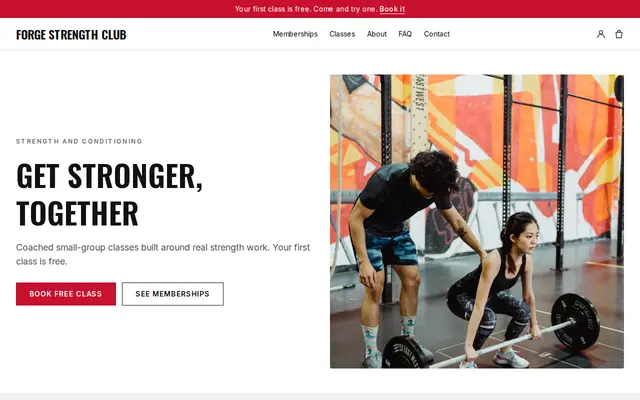
Made for Gyms, Personal trainers, Boxing clubs
Energetic and strong for gyms and coaches with memberships.
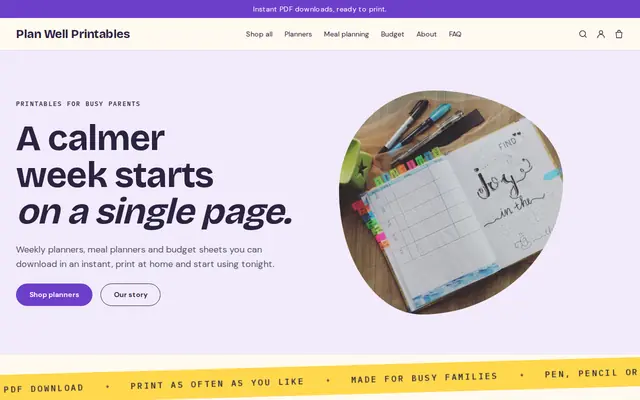
Made for Printables, Templates, Online courses
Bright and tidy for downloads, templates and courses.
Advice
Whatever you build it with, these are the things that turn visitors into customers.
Online coaching is crowded. “Strength for new parents” or “coaching for a first marathon” is easier to find and easier to trust than “fitness for everyone”.
Check-in day, the app you use, when you reply and how programs change. People buying from a distance want the routine spelled out before they pay.
Avoid promising pounds lost or a timeline. Health claims in advertising are regulated in many countries, and ad platforms like Meta restrict before-and-after images.
General healthy eating advice is fine for many coaches, but meal plans for medical conditions belong with registered dietitians. “Dietitian” is a protected title in the UK and many US states.
If you coach clients abroad, say which time zone you work in and when check-ins happen. Your prices show in one currency, so name it.
How it works
A sentence or two is enough: what you do, who it’s for and how people buy from you.
Cornerrr writes your pages, adds your products or services, and picks the colours, fonts and look. It takes about a minute.
Link a Stripe account, or create one in a few minutes. Your customers pay you directly.
Publish on your free Cornerrr web address, or use your own. Change anything later by asking.
Payments
Payments go through your own Stripe account, straight to you. Your customers see the methods you turn on in Stripe that work for their country and currency.
Selling in Europe or the US? United States, United Kingdom, Germany, France, Netherlands, Ireland and every country we cover.
Pricing
Build and preview for free, no card needed. Every paid plan starts with a 14-day free trial, and Cornerrr adds no transaction fees.
Build your website and try everything before you go live.
$0free
Go live and start selling.
$19a month
Most popular
For growing businesses with subscriptions and deliveries.
$49a month
For several stores and bigger catalogues.
$99a month
Questions
Yes, on the Growth plan. Each coaching plan is a subscription billed by Stripe, with optional free trial days. Clients see their plan in their account, and changes go through you for now.
Not behind a login: Cornerrr has no private video library for clients. Sell programs as downloadable files, or deliver videos through the coaching app you already use.
Add it as a digital product on any paid plan and upload the file. Buyers get it straight after paying, and it stays in their account if they lose the email.
Yes. Stripe Checkout takes cards and wallets from most countries and shows itself in your website’s language. Prices are in one currency, and the Pro plan adds prices in other currencies.
No. You describe your business in your own words and Cornerrr builds the website. Afterwards you change things by clicking, or by asking the assistant in plain words.
Building and previewing your website is free, with no card needed. To go live and take payments, choose a plan from $19 a month. Every paid plan starts with a 14-day free trial; a card is needed to start it.
Describe your business and see your website in about a minute. It’s free until you go live.