Preview
Build your website and try everything before you go live.
$0free
Website builder for subscription box businesses
Describe what goes in your box and Cornerrr builds a subscription box website with monthly or quarterly plans billed by Stripe, a page of past boxes, prepaid gift plans and the ship date for each month.

What you get
Cornerrr writes every page from your description, then you change anything by clicking or by asking.
Billed every month, every three months or once a year by Stripe on the Growth plan, as options of one plan with their own prices. Subscribers see their plan in their account.
Leftover boxes become products with stock, so last month’s extras sell as gifts instead of filling the spare room. Checkout stops when the last one is gone.
Three, six or twelve months paid at once, shipped to the address the buyer enters at checkout. Gift plans don’t renew, which is what most gift buyers want.
Makers who want to be featured, and companies ordering boxes for staff or clients, send their details through a request form. You answer each one from your Inbox.
Deliveries and subscriptions
Plans billed every week or month by Stripe, with one-off products and extras alongside.
Subscriptions are billed as one amount, so price each plan to include packing and postage. One-off box sales use the fixed shipping rates you set, up to five per currency.
Boxes travel far, and tax rules differ for food, cosmetics and books. Stripe Tax can calculate sales tax or VAT at checkout once it’s active on your Stripe account.
On any paid plan, make a percentage or fixed-amount code with dates and a usage limit. On a subscription it comes off the first payment, which suits a launch week or a partner’s followers.
Cornerrr writes the plan page, How it works and the past boxes page from your description, and can make a listing from a photo of the box. Ask the assistant to change the tone any time.
Ready-made themes
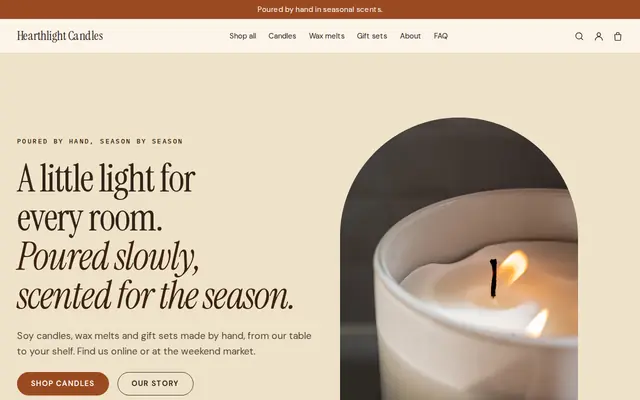
Made for Candle makers, Home goods, Craft makers
Cosy and warm for makers of candles and home goods.
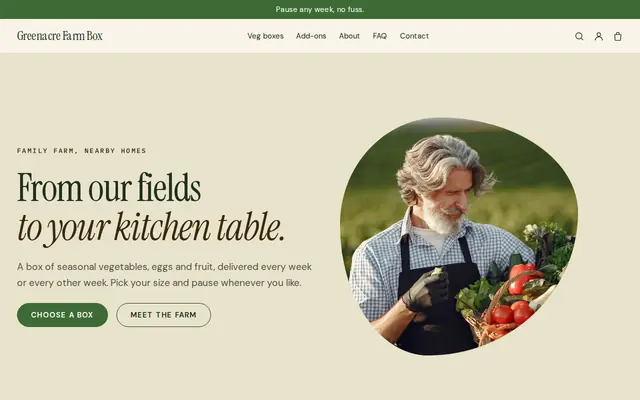
Made for Farm boxes, Meal kits, Local deliveries
Earthy and friendly for farm boxes, meal kits and deliveries that repeat.
Advice
Whatever you build it with, these are the things that turn visitors into customers.
New visitors want to know what they’d actually get. A page of past boxes with a photo and a list of every item does more than a mystery-box promise.
Say when each box ships and the date to join in time for it, such as join by the 10th for this month’s box. “Where’s my box” emails drop when those dates are on the home page.
Weigh a packed box, add the mailer, filler and postage to the farthest place you ship, and build it into the plan price. Leave room for postage increases, which come every year or two.
Subscribers contact you to cancel or change, so say how and by when. Several US states have automatic renewal laws about clear terms and cancelling, and the EU and UK have consumer rules too, so check what applies to you.
Order stock from your makers with that day in mind, and say in your FAQ that sign-ups after the cut-off start with next month’s box.
How it works
A sentence or two is enough: what you do, who it’s for and how people buy from you.
Cornerrr writes your pages, adds your products or services, and picks the colours, fonts and look. It takes about a minute.
Link a Stripe account, or create one in a few minutes. Your customers pay you directly.
Publish on your free Cornerrr web address, or use your own. Change anything later by asking.
Payments
Payments go through your own Stripe account, straight to you. Your customers see the methods you turn on in Stripe that work for their country and currency.
Selling in Europe or the US? United States, United Kingdom, Germany, France, Netherlands, Ireland and every country we cover.
Pricing
Build and preview for free, no card needed. Every paid plan starts with a 14-day free trial, and Cornerrr adds no transaction fees.
Build your website and try everything before you go live.
$0free
Go live and start selling.
$19a month
Most popular
For growing businesses with subscriptions and deliveries.
$49a month
For several stores and bigger catalogues.
$99a month
Questions
A clear theme for the box, a price that covers items, packing and postage, a ship date, and photos of a real box. On Cornerrr’s Growth plan Stripe bills subscribers monthly or quarterly, and the plan and How it works pages are written for you.
They see their subscription in their account but can’t cancel it themselves yet. Add a cancel form or an email address to your FAQ; the request lands in your Inbox and you cancel it in your Stripe Dashboard.
Yes. Make it a one-time product with stock set to the boxes you have left, with fixed shipping rates. Checkout stops when they’re gone.
Yes. Plans can bill every month, every three months or once a year, each as an option with its own price. A yearly option paid up front suits gift buyers and your most loyal subscribers.
No. You describe your business in your own words and Cornerrr builds the website. Afterwards you change things by clicking, or by asking the assistant in plain words.
Building and previewing your website is free, with no card needed. To go live and take payments, choose a plan from $19 a month. Every paid plan starts with a 14-day free trial; a card is needed to start it.
Describe your business and see your website in about a minute. It’s free until you go live.