Preview
Build your website and try everything before you go live.
$0free
Website builder for personal trainers
Say where you train people and who you work with, and Cornerrr builds your personal trainer website: your story, packs of sessions, a consultation request form and an FAQ about how you work. Edit it by clicking or by asking.

What you get
Cornerrr writes every page from your description, then you change anything by clicking or by asking.
Single sessions and packs of 5, 10 or 20 as products, with options for where you train: your studio, the client’s home or a park. Clients pay at checkout and you arrange times by email.
People tell you their goal, how often they can train and where, in a short form. It lands in your Inbox and by email, and you reply to set up a first chat.
A monthly plan for clients who also train on their own, with a program and check-ins, billed automatically by Stripe on the Growth plan. Clients see the plan in their account.
Sell a four-week beginner plan or a home workout guide as a PDF on any paid plan. Buyers get the file after paying, and it stays in their account.
Fitness, lessons and classes
Your services with prices, or “price on request” so clients ask first, and every request in your Inbox.
Cornerrr writes your About page from a sentence or two: who you train, your qualifications and how a session runs. Ask the assistant to make it warmer, shorter or more direct.
Show prices on your standard packs and mark specialist programs “price on request”. Hidden prices swap the cart button for a request form.
Clients pay by card, Apple Pay, Google Pay and the local methods you turn on, straight into your Stripe account. Cornerrr adds nothing on top of Stripe’s own fees.
Ready-made themes
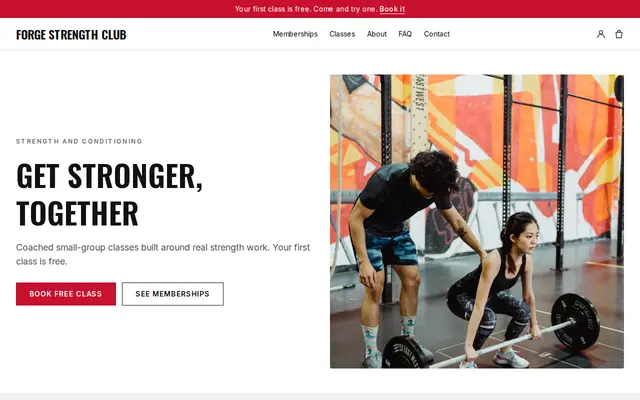
Made for Gyms, Personal trainers, Boxing clubs
Energetic and strong for gyms and coaches with memberships.
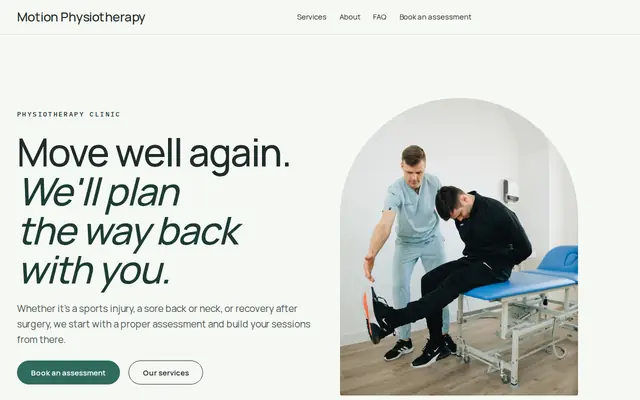
Made for Physiotherapists, Chiropractors, Massage therapists
Fresh and professional for therapists and health practices.
Advice
Whatever you build it with, these are the things that turn visitors into customers.
New parents, beginners, runners, people coming back after an injury. One clear line about who you train does more than “transform your body”, and the right people recognize themselves.
Name your certification and who issued it, such as NASM or ACE in the US, or a Level 3 personal training qualification in the UK, and say you’re insured. Careful clients check this first.
Do your health screening, like a PAR-Q, in person or through a secure tool, not in a website form. Online, ask only for contact details and goals.
Avoid promising pounds lost or a timeline. Describe how you plan sessions, adjust them and keep people going. Only share client stories with written permission.
Name the gyms, parks or neighborhoods you work in and whether you travel to clients. “Personal trainer” plus a town is how many people look for one.
How it works
A sentence or two is enough: what you do, who it’s for and how people buy from you.
Cornerrr writes your pages, adds your products or services, and picks the colours, fonts and look. It takes about a minute.
Link a Stripe account, or create one in a few minutes. Your customers pay you directly.
Publish on your free Cornerrr web address, or use your own. Change anything later by asking.
Payments
Payments go through your own Stripe account, straight to you. Your customers see the methods you turn on in Stripe that work for their country and currency.
Selling in Europe or the US? United States, United Kingdom, Germany, France, Netherlands, Ireland and every country we cover.
Pricing
Build and preview for free, no card needed. Every paid plan starts with a 14-day free trial, and Cornerrr adds no transaction fees.
Build your website and try everything before you go live.
$0free
Go live and start selling.
$19a month
Most popular
For growing businesses with subscriptions and deliveries.
$49a month
For several stores and bigger catalogues.
$99a month
Questions
They can buy a pack of sessions or send a request, and you agree the times by email. Cornerrr has no calendar or automatic booking, so your diary stays yours to manage.
Add it as a product with a price, and add options if home visits cost more. Paid orders arrive by email and in your Orders list with the client’s contact details.
Many people want an idea of cost before they get in touch. If you’d rather talk first, mark your packs “price on request” and a request form replaces the cart button.
It’s better not to. Website forms aren’t the place for medical details, so ask for contact details and goals there, and do your screening at the first session.
No. You describe your business in your own words and Cornerrr builds the website. Afterwards you change things by clicking, or by asking the assistant in plain words.
Building and previewing your website is free, with no card needed. To go live and take payments, choose a plan from $19 a month. Every paid plan starts with a 14-day free trial; a card is needed to start it.
Describe your business and see your website in about a minute. It’s free until you go live.