Preview
Build your website and try everything before you go live.
$0free
Website builder for yoga studios
Describe your studio, its styles and teachers, and Cornerrr builds a quiet, clear yoga studio website: the timetable, drop-ins, class packs, memberships and workshops, with a form for questions. Adjust any of it in plain words.

What you get
Cornerrr writes every page from your description, then you change anything by clicking or by asking.
A single class, a 5-pack and a 10-pack as products, with how long each pass lasts in its description. Students buy online and give their name at the desk.
Monthly or yearly memberships as subscriptions on the Growth plan, with optional free trial days for new students. Stripe bills each period, and members see their plan in their account.
Weekend workshops, inversion clinics and sound baths as products, with stock set to the mats in the room. Checkout stops when the room is full.
Longer programs often need a conversation first. List them with the price hidden and an application form, and the applications land in your Inbox.
Fitness, lessons and classes
Plans billed every week or month by Stripe, with one-off products and extras alongside.
Weekly classes on their own page, by day and time, with the level and the teacher. Cornerrr has no class sign-up, so the page tells people which pass to buy and when to turn up.
Cornerrr writes a short description of each style you teach, so a beginner knows yin from vinyasa before they arrive. Edit any word by clicking.
Students pay through your own Stripe account. Memberships take cards, Apple Pay, Google Pay and direct debits where Stripe supports them, and Cornerrr takes no cut.
Ready-made themes
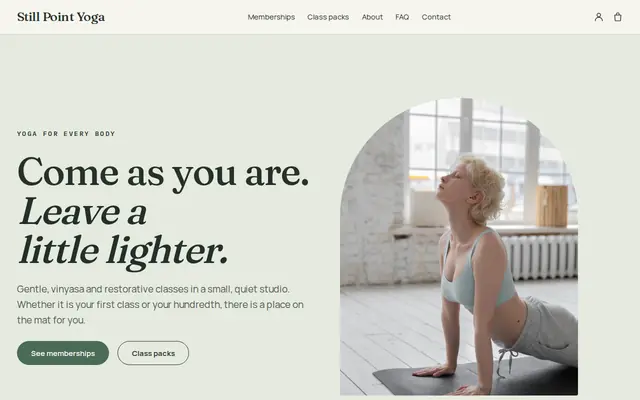
Made for Yoga studios, Pilates, Meditation
Serene and spacious for studios with classes and memberships.
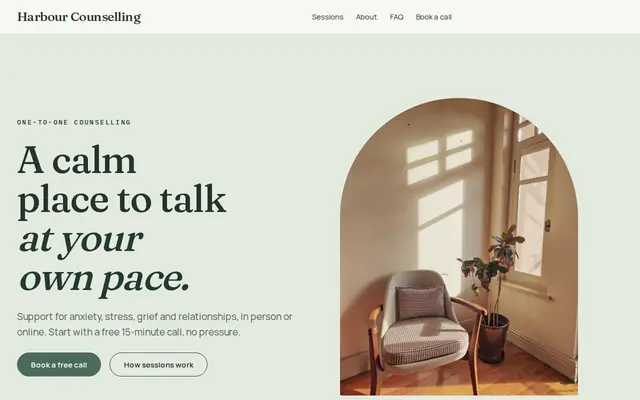
Made for Counsellors, Therapists, Life coaches
Soft and quiet for counsellors, coaches and therapists.
Advice
Whatever you build it with, these are the things that turn visitors into customers.
A beginner page answers the real worries: what to wear, whether to bring a mat, how early to arrive, whether the room is heated and what happens if they can’t touch their toes.
Drop-in, pack and membership in one table, with how long each lasts and whether it covers workshops. Pass rules are a question every studio desk hears daily.
A photo, the styles they teach, their training and one honest line about their classes. Many students choose a teacher before they choose a studio.
If your teachers are registered with Yoga Alliance or a similar body, say at which level, like RYT-200. Leave out words like “therapy” unless a teacher is qualified to use them.
An old timetable sends people to a class that isn’t running. Update the page whenever the schedule changes, and keep your Google Business Profile hours the same.
How it works
A sentence or two is enough: what you do, who it’s for and how people buy from you.
Cornerrr writes your pages, adds your products or services, and picks the colours, fonts and look. It takes about a minute.
Link a Stripe account, or create one in a few minutes. Your customers pay you directly.
Publish on your free Cornerrr web address, or use your own. Change anything later by asking.
Payments
Payments go through your own Stripe account, straight to you. Your customers see the methods you turn on in Stripe that work for their country and currency.
Selling in Europe or the US? United States, United Kingdom, Germany, France, Netherlands, Ireland and every country we cover.
Pricing
Build and preview for free, no card needed. Every paid plan starts with a 14-day free trial, and Cornerrr adds no transaction fees.
Build your website and try everything before you go live.
$0free
Go live and start selling.
$19a month
Most popular
For growing businesses with subscriptions and deliveries.
$49a month
For several stores and bigger catalogues.
$99a month
Questions
Not with Cornerrr yet: there’s no class booking. Students buy a drop-in, pack or membership online and come to class. Workshops can be limited to your number of mats with stock.
Add it as a product with a price and a line about how long it’s valid. Each sale shows in your Orders list with the student’s name and email, so you can keep a tally at the desk.
Yes. On the Growth plan a membership can start with free trial days, and on any paid plan a discount code can take an amount off an intro pack, limited to once per customer.
Yes. List it with the price hidden and an application form, or with a price and limited places if you take payment upfront. Applications land in your Inbox and by email.
No. You describe your business in your own words and Cornerrr builds the website. Afterwards you change things by clicking, or by asking the assistant in plain words.
Building and previewing your website is free, with no card needed. To go live and take payments, choose a plan from $19 a month. Every paid plan starts with a 14-day free trial; a card is needed to start it.
Describe your business and see your website in about a minute. It’s free until you go live.