Preview
Build your website and try everything before you go live.
$0free
Website builder for breweries
Describe your brewery and Cornerrr builds a brewery website with your tap list, taproom hours, merch and, where your license and local law allow, cans to order online. Private parties and tour requests land in your Inbox.
What you get
Cornerrr writes every page from your description, then you change anything by clicking or by asking.
Each beer with its style, strength and tasting notes, so regulars can see what’s pouring this week. Update it by asking the assistant when a keg kicks.
Limited releases as products with set stock, where your license and the law allow selling beer online. Checkout stops when the batch is gone.
T-shirts, hats, glassware and gift sets with sizes and options, shipped with fixed rates you set. It’s the part of a brewery shop that can travel almost anywhere.
Taproom parties, birthdays, team outings and brewery tours listed as “price on request”. Groups send the date and size, and you confirm by email.
Food and drink
Products with photos, options, prices and stock, a cart and a Stripe checkout.
Hours, food truck days, dog and kid policies, parking and accessibility on one page that’s easy to keep current, by clicking or by asking the assistant.
Pick the countries you ship to and set fixed rates. Where beer can only go to some states or regions, say so on each product and check every order before it goes out.
On the Growth plan, post release notes, collaboration stories and event news as blog posts that stay on your site, not only on social media.
Orders are paid straight into your own Stripe account. Check Stripe’s list of restricted businesses for your country before you sell alcohol through it.
Ready-made themes
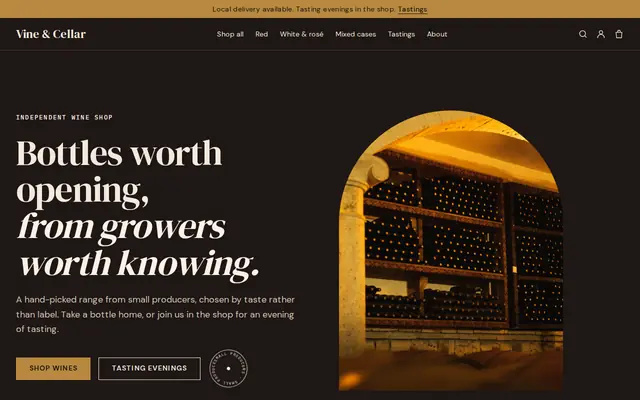
Made for Sauces and condiments, Snacks, Food gifts
Loud, playful and colourful for food makers with personality.
Advice
Whatever you build it with, these are the things that turn visitors into customers.
Most people open a brewery website to decide whether to go tonight. Hours, address, what’s on tap and whether there’s food should be the first things they see.
Selling and shipping beer to customers depends on your license and where they live. Many US states limit or ban shipping beer to consumers, and in the EU selling to another country usually means excise duty there. Check the rules for each place.
Put the legal drinking age on every beer product and in your FAQ, and use a carrier service that checks ID on delivery. Carriers set their own alcohol rules; USPS, for example, won’t carry it.
Trivia nights, food trucks and release days give people a reason to come back. Keep them on one page and refresh the week’s list every Monday.
Show the taproom full of people, the brewhouse and the patio in summer. A good beer photo is easy; a room people want to spend an evening in is what brings them.
How it works
A sentence or two is enough: what you do, who it’s for and how people buy from you.
Cornerrr writes your pages, adds your products or services, and picks the colours, fonts and look. It takes about a minute.
Link a Stripe account, or create one in a few minutes. Your customers pay you directly.
Publish on your free Cornerrr web address, or use your own. Change anything later by asking.
Payments
Payments go through your own Stripe account, straight to you. Your customers see the methods you turn on in Stripe that work for their country and currency.
Selling in Europe or the US? United States, United Kingdom, Germany, France, Netherlands, Ireland and every country we cover.
Pricing
Build and preview for free, no card needed. Every paid plan starts with a 14-day free trial, and Cornerrr adds no transaction fees.
Build your website and try everything before you go live.
$0free
Go live and start selling.
$19a month
Most popular
For growing businesses with subscriptions and deliveries.
$49a month
For several stores and bigger catalogues.
$99a month
Questions
Cornerrr lets you list cans as products, but whether you may sell them online depends on your license and the laws where your customers live. Check with your licensing authority, and check Stripe’s rules for alcohol in your country.
They can send a request with the date, group size and occasion. It lands in your Inbox and email, and you confirm by email. There’s no booking calendar, so you decide what fits around opening hours.
Keep it as a simple page, or as products if you sell cans. On Cornerrr you ask the assistant to add a new beer or mark one gone in plain words, then apply the change.
Yes. Merch ships like any product: set fixed shipping rates, choose the countries you ship to and add a tracking number when it goes out. Customers get a shipping email with the tracking link.
No. You describe your business in your own words and Cornerrr builds the website. Afterwards you change things by clicking, or by asking the assistant in plain words.
Building and previewing your website is free, with no card needed. To go live and take payments, choose a plan from $19 a month. Every paid plan starts with a 14-day free trial; a card is needed to start it.
Describe your business and see your website in about a minute. It’s free until you go live.