Preview
Build your website and try everything before you go live.
$0free
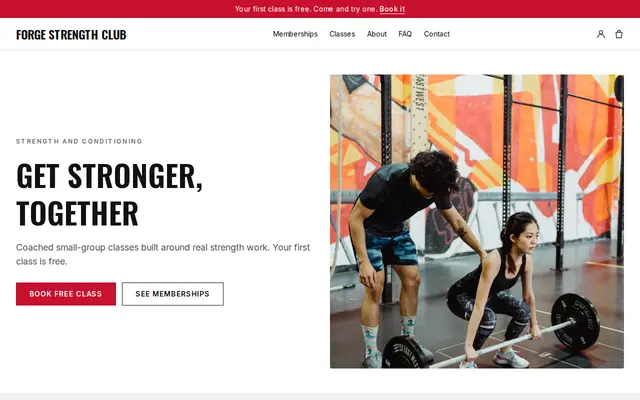
Website builder for gyms
Tell Cornerrr about your gym in a sentence or two and it builds your gym website: memberships, day passes, class packs, opening hours, the equipment, your coaches and a form for trial requests. Change anything later by asking.

What you get
Cornerrr writes every page from your description, then you change anything by clicking or by asking.
Monthly and yearly memberships as subscriptions on the Growth plan, charged automatically by Stripe. Add a few free trial days if you want people to try the gym before the first payment.
Visitors and travelers buy a day pass or a 10-class pack as a product, paid at checkout. A six-week strength course with limited places can carry stock, so it closes when it’s full.
A short form for people who want to look around or try a session first. Requests land in your Inbox with their name, email and phone number, and you reply to set a time.
List one-to-one sessions with your coaches with the price hidden. People say what they want to work on and when they can train, and you reply by email with times and a price.
Fitness, lessons and classes
Plans billed every week or month by Stripe, with one-off products and extras alongside.
Members pay through your own Stripe account by card, Apple Pay, Google Pay and, where Stripe offers it in your country, direct debits like ACH, SEPA or Bacs. Cornerrr adds no transaction fee.
Members sign in with a code sent to their email, with no password to forget, and see their membership and past payments. Freezing or canceling goes through you for now.
Your address, staffed hours, a map link and a phone number that dials when tapped sit on your contact page, so someone searching for a gym nearby sees at once when you’re open.
Ask the assistant to add a summer membership, rewrite your coach bios or write page titles that name your town, then apply the change or undo it.
Ready-made themes
Made for Gyms, Personal trainers, Boxing clubs
Energetic and strong for gyms and coaches with memberships.
Advice
Whatever you build it with, these are the things that turn visitors into customers.
People join gyms they can picture themselves in. Photograph your racks, the turf, the changing rooms and a class at the hour most members train, and put the best photo first.
Access hours, classes included, guest passes, contract length and notice to cancel. Two or three options side by side answer most questions before anyone emails you.
Say how long the commitment is and how to cancel, in the same words as your sign-up terms. Many US states and European countries have rules for gym contracts, so check yours before you publish.
Where to park, whether there’s an induction, what to bring, whether beginners are welcome and when the gym is quiet. Nervous first-timers look for exactly these answers before they walk in.
Most people search “gym near me” or “gym in” plus their area. Use your town and neighborhood in your page titles, and keep your Google Business Profile hours the same as your website’s.
How it works
A sentence or two is enough: what you do, who it’s for and how people buy from you.
Cornerrr writes your pages, adds your products or services, and picks the colours, fonts and look. It takes about a minute.
Link a Stripe account, or create one in a few minutes. Your customers pay you directly.
Publish on your free Cornerrr web address, or use your own. Change anything later by asking.
Payments
Payments go through your own Stripe account, straight to you. Your customers see the methods you turn on in Stripe that work for their country and currency.
Selling in Europe or the US? United States, United Kingdom, Germany, France, Netherlands, Ireland and every country we cover.
Pricing
Build and preview for free, no card needed. Every paid plan starts with a 14-day free trial, and Cornerrr adds no transaction fees.
Build your website and try everything before you go live.
$0free
Go live and start selling.
$19a month
Most popular
For growing businesses with subscriptions and deliveries.
$49a month
For several stores and bigger catalogues.
$99a month
Questions
Not yet. Cornerrr has no class booking or calendar. Post your timetable as a page, sell memberships and class packs, and if you already use a booking app, link to it from the timetable page.
Yes, on the Growth plan. A membership can start with free trial days, and Stripe takes the first payment when they end. You can also take trial requests through a form and invite people in.
Yes. A day pass, a week pass or a class pack is an ordinary product with a price and a checkout. Paid orders arrive by email and in your Orders list, so the front desk can check names.
Recurring memberships are subscriptions, which need the Growth plan. Day passes, packs and trial requests need only Starter, and you can build and preview the whole website for free first.
No. You describe your business in your own words and Cornerrr builds the website. Afterwards you change things by clicking, or by asking the assistant in plain words.
Building and previewing your website is free, with no card needed. To go live and take payments, choose a plan from $19 a month. Every paid plan starts with a 14-day free trial; a card is needed to start it.
Describe your business and see your website in about a minute. It’s free until you go live.