Preview
Build your website and try everything before you go live.
$0free
Website builder for bookstores
Tell Cornerrr about your bookstore, your sections and your events, and it builds a bookstore website with staff picks, books to buy, special order requests and tickets for readings. You change it later by asking.
What you get
Cornerrr writes every page from your description, then you change anything by clicking or by asking.
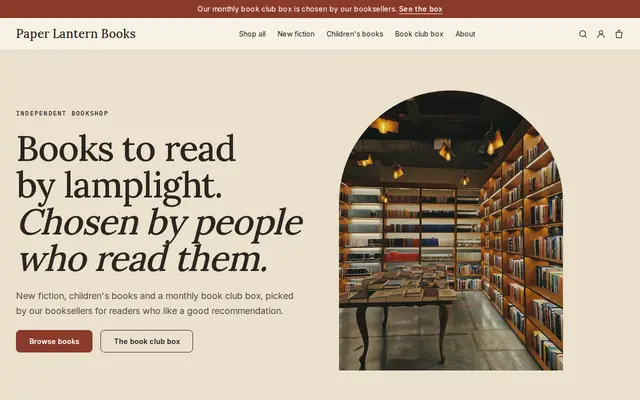
Each pick is a product with the cover, a two-line note from whoever chose it, and the format and condition. A personal recommendation is what an independent offers that a giant online retailer can’t.
A request form for titles you don’t have on the shelf. Customers send the title, author or ISBN, and you reply by email with the price and when it should arrive.
Each event is a product with a ticket count, so checkout stops when the room is full. For free events, a request form works as an RSVP so you know how many chairs to put out.
A monthly or quarterly book chosen by your staff, billed by Stripe on the Growth plan. Subscribers see their plan in their account, and you ship each new pick.
Shops and makers
Products with photos, options, prices and stock, a cart and a Stripe checkout.
On the Growth plan, bring in your books from a spreadsheet with titles, prices, stock and ISBNs as SKUs, instead of adding them one at a time.
A signed first edition is a product with a stock of one, and checkout stops once it’s sold. Describe condition in the same words every time so collectors can compare.
On the Growth plan, write about new releases, author visits and what your staff are reading on your own blog, which also gives search engines more pages to find.
Set fixed shipping rates that fit how you post books, add the tracking number when a parcel goes out, and your customer gets a shipping email with the link.
Ready-made themes
Made for Bookshops, Stationers, Record shops
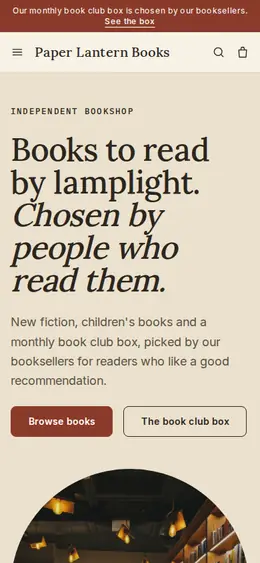
Bookish and characterful for bookshops and stationers.
Advice
Whatever you build it with, these are the things that turn visitors into customers.
Germany, France, Austria and several other European countries fix the selling price of new books, which limits the discounts you can offer on them. Check the rules before you create discount codes that apply to new titles.
In the US, USPS Media Mail is a cheaper, slower service for books. Base a standard rate on it, offer a faster rate too, and give each its delivery estimate so nobody expects a paperback overnight.
Signed copies, local authors, your own bestseller list, your staff’s handwriting on shelf talkers. Put these on the home page, because they’re the reasons to buy from you rather than a chain.
Use one set of words for condition, such as fine, very good, good and fair, and explain them once on a page. Mention dust jackets, inscriptions and ex-library marks every time.
Readers search for author events in their town. Put the author, date and place in each event’s title, and list what’s coming up on the home page.
How it works
A sentence or two is enough: what you do, who it’s for and how people buy from you.
Cornerrr writes your pages, adds your products or services, and picks the colours, fonts and look. It takes about a minute.
Link a Stripe account, or create one in a few minutes. Your customers pay you directly.
Publish on your free Cornerrr web address, or use your own. Change anything later by asking.
Payments
Payments go through your own Stripe account, straight to you. Your customers see the methods you turn on in Stripe that work for their country and currency.
Selling in Europe or the US? United States, United Kingdom, Germany, France, Netherlands, Ireland and every country we cover.
Pricing
Build and preview for free, no card needed. Every paid plan starts with a 14-day free trial, and Cornerrr adds no transaction fees.
Build your website and try everything before you go live.
$0free
Go live and start selling.
$19a month
Most popular
For growing businesses with subscriptions and deliveries.
$49a month
For several stores and bigger catalogues.
$99a month
Questions
Yes. Each copy can be its own product with a stock of one, photos of the cover and any flaws, and your condition notes. When it sells, checkout stops for that copy.
Yes. Add a special order form: customers send the title and how to reach them, the request lands in your Inbox and by email, and you reply with the price and timing.
Yes, on the Growth plan. A monthly book box or a “blind date with a book” club can be billed by Stripe every month or every few months, and subscribers see it in their account.
Not at first. Start with staff picks, signed copies, local authors and books for your events, which people can’t find elsewhere, and add more as you see what sells online.
No. You describe your business in your own words and Cornerrr builds the website. Afterwards you change things by clicking, or by asking the assistant in plain words.
Building and previewing your website is free, with no card needed. To go live and take payments, choose a plan from $19 a month. Every paid plan starts with a 14-day free trial; a card is needed to start it.
Describe your business and see your website in about a minute. It’s free until you go live.