Preview
Build your website and try everything before you go live.
$0free
Website builder for coffee shops and cafés
Tell Cornerrr about your café in a sentence or two and it builds a coffee shop website with your menu, hours and story, plus bags of beans and merch people can order online. Ask the assistant to change anything later.
What you get
Cornerrr writes every page from your description, then you change anything by clicking or by asking.
The coffees on your grinder, sold in bags with grind and bag size as options and stock for each. Regulars who love your house blend can buy it to take home or have it sent.
Your drinks, food, milk choices and opening hours on a clear menu page that reads well on a phone during the walk over. Change a price or add a seasonal drink by asking the assistant.
Coffee carafes and pastry boxes for meetings, listed as “price on request”. Offices send the date, headcount and address, and the request lands in your Inbox for you to confirm by email.
A bag of your house blend every two weeks or every month, billed by Stripe on the Growth plan. Subscribers see their plan in their account, and you know how much to buy in.
Food and drink
Products with photos, options, prices and stock, a cart and a Stripe checkout.
Mugs, tote bags, tees and hoodies as products with size and color options, each with its own stock, so you only sell what’s really in the back room.
Summer cold brew out, a winter spiced latte in: tell the assistant what’s changing on the menu or in your hours, then apply the edit with one click, or undo it.
Set fixed shipping rates for bags of coffee and choose the countries you send to. A free-shipping discount code above an order amount you pick nudges people to buy two bags.
Bean and merch orders are paid into your own Stripe account, with cards and wallets like Apple Pay and Google Pay at checkout. Cornerrr adds no transaction fee.
Ready-made themes
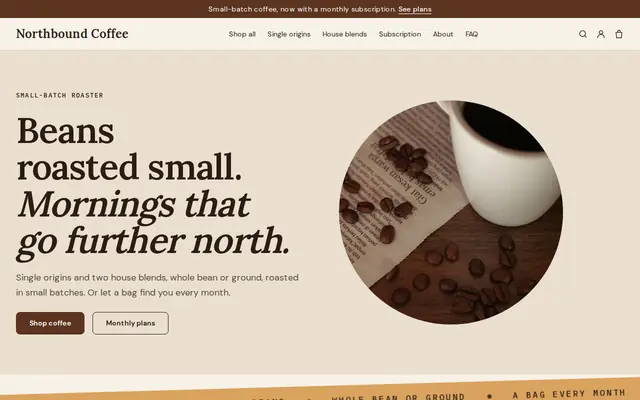
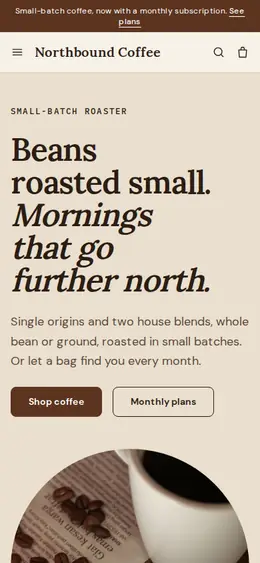
Made for Coffee roasters, Tea shops, Cafés
Bold and modern for roasters, coffee shops and tea sellers.
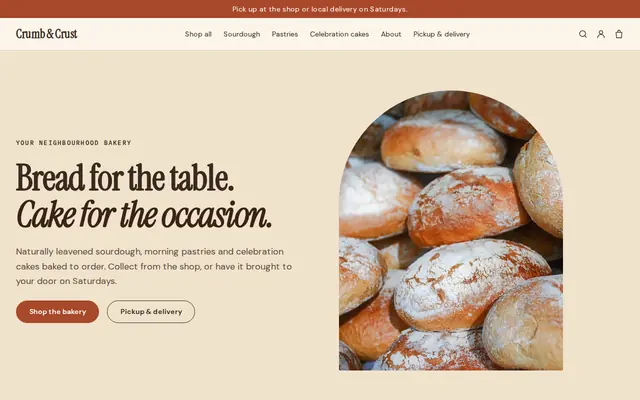
Made for Bakeries, Cafés, Cake makers
Warm and hand-made, with room for daily bakes and cakes to order.
Advice
Whatever you build it with, these are the things that turn visitors into customers.
Opening hours are the detail people look up most for any café. Show them on the home page and keep them identical on your website, your Google Business Profile and your door, holiday changes included.
People choose a coffee shop for where they’ll sit. Show the seating, the window light and the counter, and say plainly whether you have Wi-Fi, outlets, a restroom and room for strollers or laptops.
List your plant milks, decaf and sugar-free syrups, and say which pastries contain nuts or gluten. Those are the questions your baristas answer all day.
If you serve a local roaster’s coffee, say whose. If you roast your own, say where the beans come from. Coffee people search for both, and it gives you something to sell by the bag.
A short page about meeting coffee and pastry boxes, with how much notice you need and the area you deliver to, brings in weekday orders that walk-in trade alone can’t.
How it works
A sentence or two is enough: what you do, who it’s for and how people buy from you.
Cornerrr writes your pages, adds your products or services, and picks the colours, fonts and look. It takes about a minute.
Link a Stripe account, or create one in a few minutes. Your customers pay you directly.
Publish on your free Cornerrr web address, or use your own. Change anything later by asking.
Payments
Payments go through your own Stripe account, straight to you. Your customers see the methods you turn on in Stripe that work for their country and currency.
Selling in Europe or the US? United States, United Kingdom, Germany, France, Netherlands, Ireland and every country we cover.
Pricing
Build and preview for free, no card needed. Every paid plan starts with a 14-day free trial, and Cornerrr adds no transaction fees.
Build your website and try everything before you go live.
$0free
Go live and start selling.
$19a month
Most popular
For growing businesses with subscriptions and deliveries.
$49a month
For several stores and bigger catalogues.
$99a month
Questions
Yes. Each coffee is a product with grind and bag size as options and stock for each, and you set fixed shipping rates. Orders are paid through your Stripe account and arrive by email and in your Orders list.
Most don’t: drinks are made to order at the counter. A clear menu with prices and hours brings people in, and the online shop works best for beans, merch and office orders that travel well.
Yes. Your website can start with a menu page listing drinks, food and prices, and you edit it by clicking or by asking the assistant to add this season’s drinks.
Through a Google Business Profile with the right hours, photos and category, linked to your website. Use your neighborhood in your page titles too; on Cornerrr you can edit every page’s title and description.
No. You describe your business in your own words and Cornerrr builds the website. Afterwards you change things by clicking, or by asking the assistant in plain words.
Building and previewing your website is free, with no card needed. To go live and take payments, choose a plan from $19 a month. Every paid plan starts with a 14-day free trial; a card is needed to start it.
Describe your business and see your website in about a minute. It’s free until you go live.