Preview
Build your website and try everything before you go live.
$0free
Website builder for toy stores
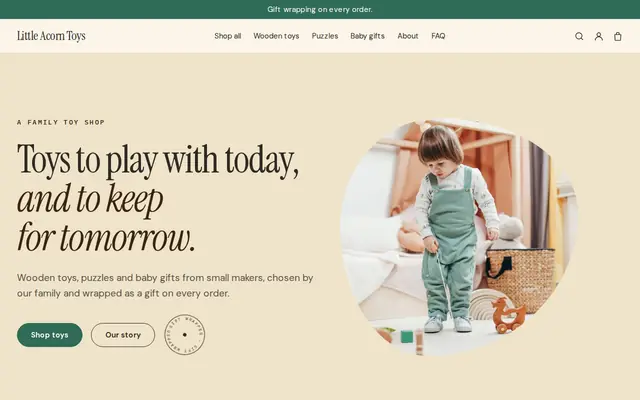
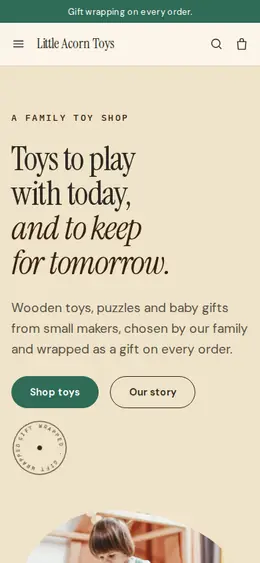
Describe your toy store and Cornerrr builds a website with collections by age and interest, products with stock and photos, room for the safety warnings each toy needs, and a Stripe checkout for gifts sent anywhere you ship.
What you get
Cornerrr writes every page from your description, then you change anything by clicking or by asking.
Collections for babies, toddlers, ages 3 to 5, 6 to 8 and 9 and up. A grandparent who only knows the child’s age can find something suitable in two clicks.
Board games and puzzles with the number of players, playing time and age on every listing, which is how people choose a game for a family evening.
Gift wrapping as an add-on product, plus a Birthday gifts collection of the toys you’d choose yourself, ready to send to the child’s address.
Bulk orders for party favors, classrooms or daycares, listed with the price hidden. Customers send the number of children and a budget, and you reply with a quote.
Shops and makers
Products with photos, options, prices and stock, a cart and a Stripe checkout.
Every product description has space for the age grade and any warning from the packaging, and the assistant can add the same safety line to a whole collection at once.
In December the toy everyone wants sells out fast. Stock goes down with every paid order and checkout stops at zero, so you don’t spend Christmas week explaining why a paid order can’t be filled.
Offer free shipping in the run-up to the holidays or a code for your newsletter sign-ups, with start and end dates you set ahead of time, on any paid plan.
Parents shop when the children are asleep. Your website takes orders and payments at any hour, and each order arrives by email and in your Orders list for the morning.
Ready-made themes
Advice
Whatever you build it with, these are the things that turn visitors into customers.
Toys sold in the EU need a CE mark, in Great Britain a UKCA or CE mark, and in the US toys for children 12 and under need a Children’s Product Certificate from the maker or importer. Ask your suppliers for the paperwork.
A puzzle box on white tells parents nothing about size. Show the toy in a hand or on a playroom floor, with the box beside it, so they can judge how big it is and what’s inside.
Grandparents and aunts want to know three things: is it right for this age, will it last, does it need batteries. Answer those in the first lines of every description.
Toy sales peak in November and December. Have your gift guides up by early November and post the last order date for delivery before the holidays at the top of the home page.
Age first, then interest: building, pretend play, outdoor, arts and crafts, games. Parents usually arrive with an age in mind, and the same toy can sit in more than one collection.
How it works
A sentence or two is enough: what you do, who it’s for and how people buy from you.
Cornerrr writes your pages, adds your products or services, and picks the colours, fonts and look. It takes about a minute.
Link a Stripe account, or create one in a few minutes. Your customers pay you directly.
Publish on your free Cornerrr web address, or use your own. Change anything later by asking.
Payments
Payments go through your own Stripe account, straight to you. Your customers see the methods you turn on in Stripe that work for their country and currency.
Selling in Europe or the US? United States, United Kingdom, Germany, France, Netherlands, Ireland and every country we cover.
Pricing
Build and preview for free, no card needed. Every paid plan starts with a 14-day free trial, and Cornerrr adds no transaction fees.
Build your website and try everything before you go live.
$0free
Go live and start selling.
$19a month
Most popular
For growing businesses with subscriptions and deliveries.
$49a month
For several stores and bigger catalogues.
$99a month
Questions
Often, yes. In the US, a cautionary statement required on the packaging, such as the choking hazard warning for small parts, must also appear where the toy is sold online. Copy it from the box into the description, and check the rules for each toy you sell.
Yes. Mark them “price on request” so they appear on your website without a cart button, and customers can ask whether one is in stock before they come in.
Yes. They enter the child’s address as the delivery address at checkout and add gift wrapping if you offer it. You wrap it and post it there.
Yes, on the Growth plan. A monthly box of books, crafts or toys for an age group can be billed by Stripe automatically, and subscribers see it in their account.
No. You describe your business in your own words and Cornerrr builds the website. Afterwards you change things by clicking, or by asking the assistant in plain words.
Building and previewing your website is free, with no card needed. To go live and take payments, choose a plan from $19 a month. Every paid plan starts with a 14-day free trial; a card is needed to start it.
Describe your business and see your website in about a minute. It’s free until you go live.