Preview
Build your website and try everything before you go live.
$0free
Online store for comics
Describe your comics and Cornerrr builds the shop: issues and collected editions with cover variants as options, signed copies, digital editions as downloads, sketch commissions on request and a Stripe checkout.

Step by step
New readers want issue one. Put the first issue or volume first on your home page, show the reading order, and offer a starter bundle of the opening issues.
One product per issue, with cover variants and signed or unsigned as options, each with its own stock. Collectors check exactly which variant they’re buying.
A PDF or CBZ file reaches readers abroad who would pay more in postage than for the comic. On any paid plan, files are delivered after payment.
Bag and board every issue, then ship in a rigid comic mailer. Bent corners and spine dings are the complaint you hear most, and collectors notice every one.
Add a few interior pages or the first chapter as a preview, so people can judge the art and lettering. A preview sells better than a cover alone.
Put your next convention dates on the home page and a card with your web address in every order. Fans who met you at a table often buy the next issue online.
Art, books and paper
Products with photos, options, prices and stock, a cart and a Stripe checkout.
Built in
Each cover variant and signed version is an option with its own price, SKU and stock, so a limited variant can’t oversell.
On any paid plan, sell PDFs or other comic files as downloads. Readers get them after paying and can download them again from their account.
Sketch covers and commissioned pages hide their price. Fans send the subject, size and date, the request lands in your Inbox, and you reply by email.
Take preorders for your next issue as a product with a set stock and a ship-by month, then add more stock for the general release.
Ready-made themes
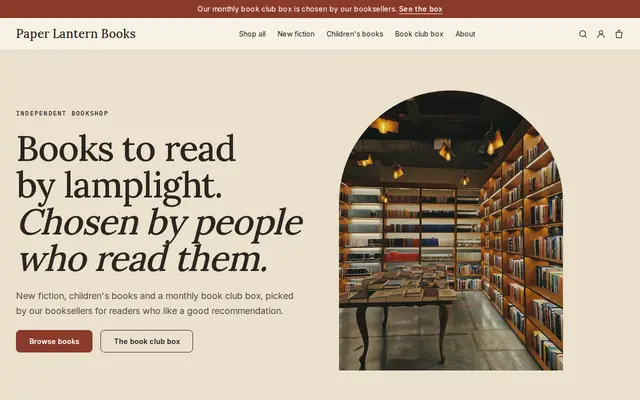
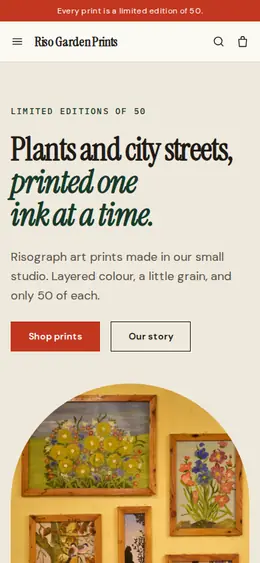
Made for Bookshops, Stationers, Record shops
Bookish and characterful for bookshops and stationers.
Before you start
If your comic has violence, sexual content or strong language, say so on the product page with a suggested age. Payment providers have rules on adult content, so read Stripe’s policies before you list it.
USPS Media Mail is cheaper for books, but its rules are strict and comics often don’t qualify. Check before you build a shipping rate around it.
If you made the comic with a co-writer or co-artist, agree in writing who owns the characters and who may sell prints, stickers or digital copies before you open a shop.
General information to help you get started, not legal advice. Rules differ by country, state and product, so check the ones that apply to you.
How it works
A sentence or two is enough: what you do, who it’s for and how people buy from you.
Cornerrr writes your pages, adds your products or services, and picks the colours, fonts and look. It takes about a minute.
Link a Stripe account, or create one in a few minutes. Your customers pay you directly.
Publish on your free Cornerrr web address, or use your own. Change anything later by asking.
Payments
Payments go through your own Stripe account, straight to you. Your customers see the methods you turn on in Stripe that work for their country and currency.
Selling in Europe or the US? United States, United Kingdom, Germany, France, Netherlands, Ireland and every country we cover.
Pricing
Build and preview for free, no card needed. Every paid plan starts with a 14-day free trial, and Cornerrr adds no transaction fees.
Build your website and try everything before you go live.
$0free
Go live and start selling.
$19a month
Most popular
For growing businesses with subscriptions and deliveries.
$49a month
For several stores and bigger catalogues.
$99a month
Questions
Put each comic in a bag with a backing board, then in a rigid comic mailer or a box with card on both sides. On Cornerrr you set fixed shipping rates and add the tracking number, so the buyer gets a shipping email with the link.
Yes, on any paid plan. Add the PDF or comic file as a digital download; readers get it after payment and can find it again in their account. There’s no built-in comic reader, so they open the file on their own device.
Both, ideally. Conventions find new readers; your website sells them the next issue and the back catalog. Put a card with your web address in every bag at your table.
Yes. Add a commission product with “price on request”. Fans send the subject, size and deadline, the request lands in your Inbox, and you agree the price by email.
No. You describe your business in your own words and Cornerrr builds the website. Afterwards you change things by clicking, or by asking the assistant in plain words.
Building and previewing your website is free, with no card needed. To go live and take payments, choose a plan from $19 a month. Every paid plan starts with a 14-day free trial; a card is needed to start it.
Describe what you sell and see your shop in about a minute. It’s free until you go live.