Creative and digital · Golden Hour
Golden Hour, a photography website template in warm, natural light
Golden Hour is a photography website template for a wedding and family photographer: four ways to work together, from full wedding days to engagement sessions, each priced on request, and a form that asks for the date, place and plans. Start with it under your own name.
- Free to build and preview
- Payments by Stripe
- No transaction fees from Cornerrr

About this theme
Golden Hour Editorial and airy for photographers and creatives who take bookings.
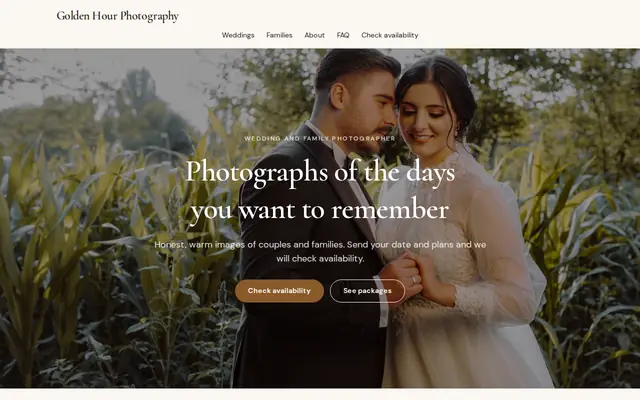
Golden Hour suits wedding and family photographers, videographers and event planners who sell by the date. Warm cream, honey brown and an elegant serif keep it editorial and airy, so your pictures carry the page. It works because a photographer’s first question is “are you free on our day?”: the hero, the menu and the contact page all say “Check availability”, and the form collects the date, location and plans you need to answer and quote in one reply.
- Made for
- Photographers, Videographers, Event planners
- Feel
- Calm: quiet and spacious
- Comes with
- 4 pages, 4 sample services
- Mood
- warm, personal, unhurried, candid
- background
- foreground
- primary
- accent
- muted
What’s inside
Every page, already written.
Home
A centered photo hero with two buttons, a choice of weddings or families, four ways to work together without prices, a block on how you work and the availability form.
About
Who you are, the light you like to work in and how couples and families get in touch, with a button to check availability.
FAQ
Checking availability, weddings and families, what to put in a request and how pricing works. Add travel, when photos are delivered and how a date is confirmed.
Contact
The “Check availability” form: name, email, phone, location, and the date and plans. Requests arrive in your Inbox and by email, and you reply with a quote.
How it works
From a few words to your own Golden Hour website, live.
Step 1: Describe your business
A sentence or two is enough: what you do, who it’s for and how people buy from you.
Step 2: We build it while you watch
Cornerrr writes your pages, adds your products or services, and picks the colours, fonts and look. It takes about a minute.
Step 3: Connect payments
Link a Stripe account, or create one in a few minutes. Your customers pay you directly.
Step 4: You’re live
Publish on your free Cornerrr web address, or use your own. Change anything later by asking.
Questions
Good to know
Should I replace Golden Hour’s photos?
Yes, all of them. The sample uses free stock photos, and couples choose a photographer on their own work. Upload your best ten or twelve images, a mix of portraits, details and candid moments.
Can I show package prices on Golden Hour?
Yes. The four sample packages are price on request, but you can give any of them a price, or add a “from” line to the description and keep the availability form for questions.
Can a videographer use Golden Hour?
Yes. Rename the packages to films, highlight reels and full-day coverage, add links to a few of your films on the About page, and ask the assistant to rewrite the words.
Golden Hour suits
- Wedding photographer website builder
- Photographer website builder
- Videographer website builder
- Event planner website builder
- Wedding planner website builder
- Photo booth rental website builder
- Personal chef website builder
- Senior living community website builder
- Makeup artist website builder
Selling with Golden Hour
More themes for creative and digital
All 33 themesMake Golden Hour yours.
Start with this theme and Cornerrr builds your website from it with your own name. Free until you go live.