Preview
Build your website and try everything before you go live.
$0free
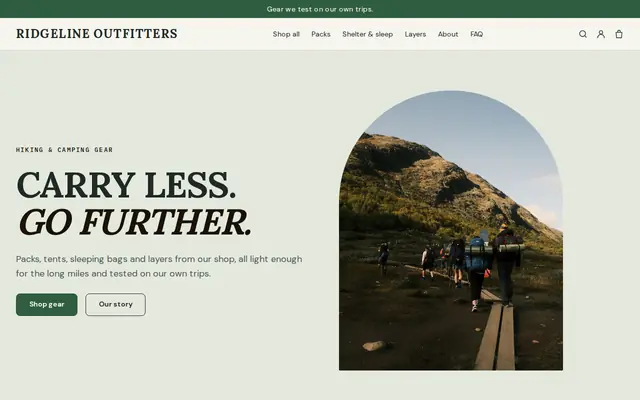
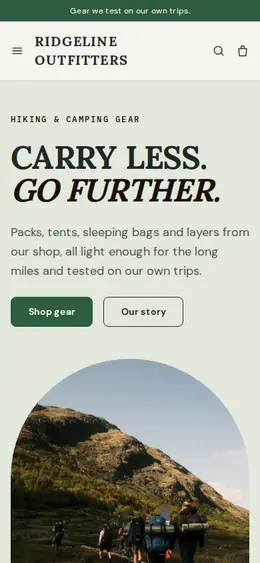
Website builder for outdoor and outfitter stores
Tell Cornerrr what your outdoor store sells and rents, and it builds the website: gear by activity, sizes and colors with stock, room for the specs people compare, rental requests and a Stripe checkout.
What you get
Cornerrr writes every page from your description, then you change anything by clicking or by asking.
Hiking, camping, climbing, paddling and winter collections that match how customers plan a trip, with the same rain jacket allowed in more than one.
Tents, packs, snowshoes or kayaks for a weekend, listed with the price hidden. Customers send their dates and sizes, and you reply to confirm what’s free and what it costs.
Size and color as options, each with its own stock, and a fit note on every product: runs small, wide toe box, room for thick winter socks.
Navigation courses or guided walks as products with a set number of places, so checkout stops when the group is full. Put the date, meeting point and kit list in the description.
Shops and makers
Products with photos, options, prices and stock, a cart and a Stripe checkout.
Ask the assistant to add weight, materials, waterproof rating and temperature rating to every product in the same order, so comparing two sleeping bags takes seconds.
Swap winter gear for summer at the top of the home page, start an end-of-season discount code or rewrite your rentals page, then apply the changes or undo them.
Rental, trip and boot fitting requests arrive in your Inbox and by email with the dates and sizes your form asked for. You reply from your own email.
Set fixed shipping rates with delivery estimates and the countries you send to. For bulky items like kayaks, mark them “price on request” and quote delivery yourself.
Ready-made themes
Made for Outdoor gear, Bike shops, Sports shops
Rugged and outdoorsy for adventure and sports shops.
Advice
Whatever you build it with, these are the things that turn visitors into customers.
Gas canisters, bear spray, lithium batteries and some knives have shipping restrictions with carriers and between countries. Check them before you list those items for delivery, or keep them for the shop.
A short weekly note on trail, snow or river conditions brings back locals and visitors planning a trip. On the Growth plan it can live on your blog.
Fit is the main reason people still buy outdoor gear in person. Give a fit note and measurements for boots, packs and harnesses, and invite people to ask a question before they order.
List what each rental includes, how and when to return it, and what happens if it comes back wet or damaged. Answer those up front and each rental takes fewer emails.
People search for gear rental plus the name of the park, lake or mountain before a trip. Use the places near you in your page titles and on your Rentals page.
How it works
A sentence or two is enough: what you do, who it’s for and how people buy from you.
Cornerrr writes your pages, adds your products or services, and picks the colours, fonts and look. It takes about a minute.
Link a Stripe account, or create one in a few minutes. Your customers pay you directly.
Publish on your free Cornerrr web address, or use your own. Change anything later by asking.
Payments
Payments go through your own Stripe account, straight to you. Your customers see the methods you turn on in Stripe that work for their country and currency.
Selling in Europe or the US? United States, United Kingdom, Germany, France, Netherlands, Ireland and every country we cover.
Pricing
Build and preview for free, no card needed. Every paid plan starts with a 14-day free trial, and Cornerrr adds no transaction fees.
Build your website and try everything before you go live.
$0free
Go live and start selling.
$19a month
Most popular
For growing businesses with subscriptions and deliveries.
$49a month
For several stores and bigger catalogues.
$99a month
Questions
Yes, as requests. List each rental with what’s included, and customers send their dates and sizes. The request lands in your Inbox and you confirm by email; there’s no booking calendar.
Yes, with fixed shipping rates you set. Rates don’t change with weight, so set one that covers your heaviest parcel, or mark the largest gear “price on request” and quote delivery.
Yes. A trip or course can be a product with a fixed number of places, and checkout stops when it fills. Customers get an order confirmation by email, and you send the joining details.
What’s in season and what you rent. Visitors from out of town want to know what they can rent for this weekend, and locals want the new gear for the season ahead.
No. You describe your business in your own words and Cornerrr builds the website. Afterwards you change things by clicking, or by asking the assistant in plain words.
Building and previewing your website is free, with no card needed. To go live and take payments, choose a plan from $19 a month. Every paid plan starts with a 14-day free trial; a card is needed to start it.
Describe your business and see your website in about a minute. It’s free until you go live.