Preview
Build your website and try everything before you go live.
$0free
Website builder for swim schools
Tell Cornerrr about your pool, your levels and the ages you teach, and it builds your swim school website: lesson levels, enrollment requests, monthly or term fees, instructor and safety details, and an FAQ for parents.
What you get
Cornerrr writes every page from your description, then you change anything by clicking or by asking.
Parents send the swimmer’s age and what they can already do, and the request lands in your Inbox. You reply with a group that fits and has room.
Ongoing lessons as a monthly subscription on the Growth plan, or a term of lessons as a product paid once. Choose whichever matches how you run your classes.
One-to-one lessons for nervous swimmers or adults learning late, listed with the price hidden so you can talk about their needs first.
A week of daily lessons in the summer break as a product, with stock set to the places in each group. It closes when the group is full.
Fitness, lessons and classes
Your services with prices, or “price on request” so clients ask first, and every request in your Inbox.
Cornerrr writes a page for your levels, from water confidence to stroke technique, so parents can place their child before they ask. Edit any level by clicking.
The form can ask for a phone number and a location, and its message box can prompt for the swimmer’s age and experience. Every request lands in your Inbox and by email.
Courses and crash weeks can carry stock equal to the places in a group. Stock goes down as each place is paid, and checkout stops at zero.
Ready-made themes
Made for Swim schools, Music lessons, Kids’ clubs
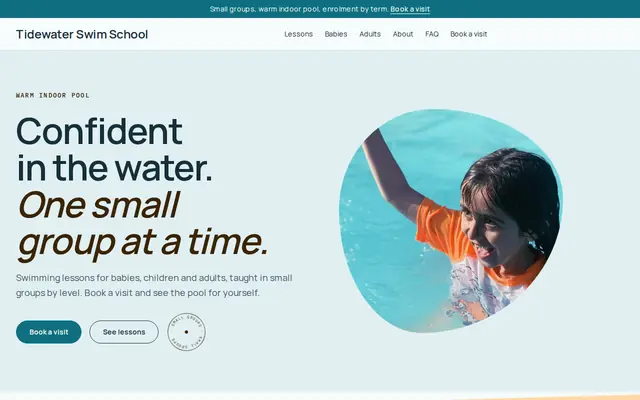
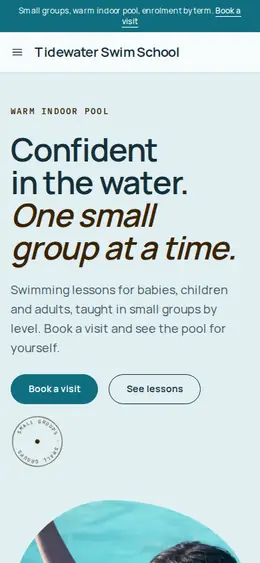
Bright and cheerful for lessons, schools and clubs.
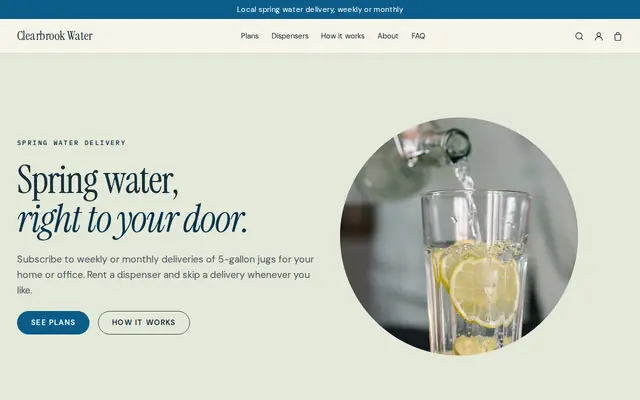
Made for Water delivery, Propane and fuel, Laundry pick-up
Clean and fresh for deliveries on a schedule.
Advice
Whatever you build it with, these are the things that turn visitors into customers.
Say who teaches, what they’re qualified in, such as American Red Cross Water Safety Instructor in the US or Swim England in the UK, and how many swimmers each teacher has in the water.
Water temperature, where parents watch from, changing rooms, swim diapers for babies and parking. Put them in your FAQ, not in a PDF nobody opens.
Instead of “Level 3”, say what a swimmer can do to start it and what they’ll learn. Parents can place their child, and moving up feels clear.
Ask about medical conditions on your enrollment paperwork or in person, not in a website form, and collect only what your instructors need to know.
Many families sign up before summer and at the start of the school year. Put the next term’s dates on your home page well before then, with how to ask for a place.
How it works
A sentence or two is enough: what you do, who it’s for and how people buy from you.
Cornerrr writes your pages, adds your products or services, and picks the colours, fonts and look. It takes about a minute.
Link a Stripe account, or create one in a few minutes. Your customers pay you directly.
Publish on your free Cornerrr web address, or use your own. Change anything later by asking.
Payments
Payments go through your own Stripe account, straight to you. Your customers see the methods you turn on in Stripe that work for their country and currency.
Selling in Europe or the US? United States, United Kingdom, Germany, France, Netherlands, Ireland and every country we cover.
Pricing
Build and preview for free, no card needed. Every paid plan starts with a 14-day free trial, and Cornerrr adds no transaction fees.
Build your website and try everything before you go live.
$0free
Go live and start selling.
$19a month
Most popular
For growing businesses with subscriptions and deliveries.
$49a month
For several stores and bigger catalogues.
$99a month
Questions
They can send an enrollment request, or buy a crash course with limited places. Cornerrr has no lesson calendar, so you confirm the group and the time by email.
Both work. Monthly fees are subscriptions on the Growth plan that keep billing until canceled, and a term is a one-off product. Pick the one families already know from you.
Yes, for anything you sell as a product. Set the stock to the places in the group, and checkout stops when they’re gone. For enrollment requests, you decide who gets a place.
Lesson levels, ages, the pool and its temperature, instructor qualifications, fees, term dates and a way to ask for a place. Cornerrr builds those pages from your description.
No. You describe your business in your own words and Cornerrr builds the website. Afterwards you change things by clicking, or by asking the assistant in plain words.
Building and previewing your website is free, with no card needed. To go live and take payments, choose a plan from $19 a month. Every paid plan starts with a 14-day free trial; a card is needed to start it.
Describe your business and see your website in about a minute. It’s free until you go live.