Fitness and classes · Tidewater
Tidewater, a swim school website template for every level
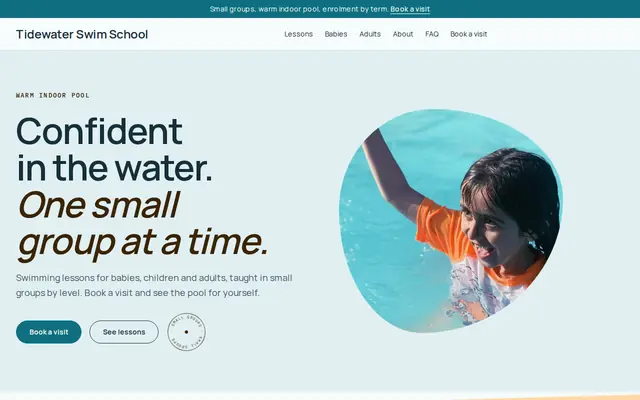
From baby splash to adult improvers, Tidewater is a swim school website template for small-group lessons in a warm pool: six classes, each sold as a term enrollment, and a form for parents who want to visit first. Start with it under your school’s name.
- Free to build and preview
- Payments by Stripe
- No transaction fees from Cornerrr

About this theme
Tidewater Bright and cheerful for lessons, schools and clubs.
Tidewater suits swim schools, music teachers and kids’ clubs that sell lessons by the term. Teal water tones with a peach accent, a friendly sans-serif and a drawn wave make it bright and reassuring for parents. It sorts swimmers before it sells: babies, children and adults each have a collection, and every class says who it’s for. Parents can enroll and pay at checkout, or send a request with the swimmer’s age and experience when they’re not sure.
- Made for
- Swim schools, Music lessons, Kids’ clubs
- Feel
- Expressive: bold type and color
- Comes with
- 4 pages, 6 sample services
- Mood
- friendly, reassuring, bright, splashy
- background
- foreground
- primary
- accent
- muted
What’s inside
Every page, already written.
Home
A hero with a drawn wave, a strip on small groups and enrollment by term, three spotlights (babies, children’s levels, adults), term classes with prices, how you teach and the visit request form.
About
The school in two short paragraphs, small groups by level and enrollment by term, and a block on the warm indoor pool with a link to visit.
FAQ
Who can join, how term enrollment works, group sizes, choosing a level and whether the pool is heated. Add term dates, what to bring and your instructors’ qualifications.
Contact
The “Book a visit” form: name, email, phone and a message about the swimmer. It lands in your Inbox, and you reply with the right level.
How it works
From a few words to your own Tidewater website, live.
Step 1: Describe your business
A sentence or two is enough: what you do, who it’s for and how people buy from you.
Step 2: We build it while you watch
Cornerrr writes your pages, adds your products or services, and picks the colours, fonts and look. It takes about a minute.
Step 3: Connect payments
Link a Stripe account, or create one in a few minutes. Your customers pay you directly.
Step 4: You’re live
Publish on your free Cornerrr web address, or use your own. Change anything later by asking.
Questions
Good to know
Can Tidewater stop a class from overfilling?
Yes. Set each term class’s stock to the number of places and checkout stops when it’s full; stock goes down with each paid enrollment. Add a new product for each term, or reset the stock when the next one opens.
What should a swim school website ask parents?
The swimmer’s age, any experience and how to reach the parent is enough for the request form. Ask about medical conditions in person or on your own enrollment paperwork, not in a website form.
Could a music teacher use Tidewater?
Yes. Rename the collections to instruments or ages, turn each class into a term of lessons, and change “Book a visit” to “Book a trial lesson”. The assistant can rewrite every page for music in one go.
Tidewater suits
- Swim school website builder
- Music teacher website builder
- Youth sports club website builder
- After-school program website builder
- Dance studio website builder
- Tutoring business website builder
- Adult day care center website builder
- Daycare website builder
- Speech therapist website builder
Selling with Tidewater
More themes for fitness and classes
- WillowAssisted living, Care homes, Home care
- BrightsideDentists, Clinics, Opticians
- MotionPhysiotherapists, Chiropractors, Massage therapists
- HarbourCounsellors, Therapists, Life coaches
- MuseHair salons, Nail studios, Beauty rooms
- FadeBarbers, Tattoo studios, Grooming
Make Tidewater yours.
Start with this theme and Cornerrr builds your website from it with your own name. Free until you go live.