Preview
Build your website and try everything before you go live.
$0free
Website builder for dance studios
Describe your studio, from baby ballet to adult hip-hop, and Cornerrr builds your dance studio website: classes by age and style, monthly tuition, registration requests, costume fees, recital tickets and a dress code page.

What you get
Cornerrr writes every page from your description, then you change anything by clicking or by asking.
Registration requests come in through a form with the dancer’s age and the styles they want. Monthly tuition is a subscription on the Growth plan, billed by Stripe.
A costume fee per routine as a product, with sizes as options when you need them, so families pay before you place the costume order.
Each show as a product with stock set to the seats in the theater. Checkout stops when it sells out, and every buyer’s name is in your Orders list.
Adult drop-in classes as products, and wedding first-dance lessons on request, so couples can tell you their song and their date.
Fitness, lessons and classes
Plans billed every week or month by Stripe, with one-off products and extras alongside.
Cornerrr groups your classes into collections by age or style, each with what to wear and what dancers learn, so parents find the right class without calling.
Add pages for the recital, the dress code or exam dates, and update them by clicking. The assistant can turn a long email to parents into a tidy page.
Tuition, costume fees and tickets all go through your own Stripe account, with cards, wallets and the local methods you turn on. Cornerrr adds no fee to any of them.
Ready-made themes
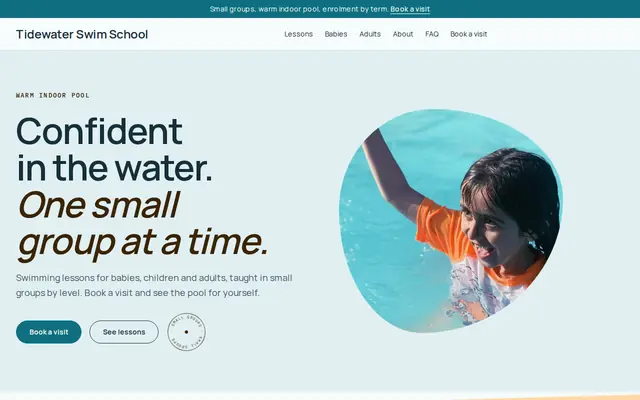
Made for Swim schools, Music lessons, Kids’ clubs
Bright and cheerful for lessons, schools and clubs.
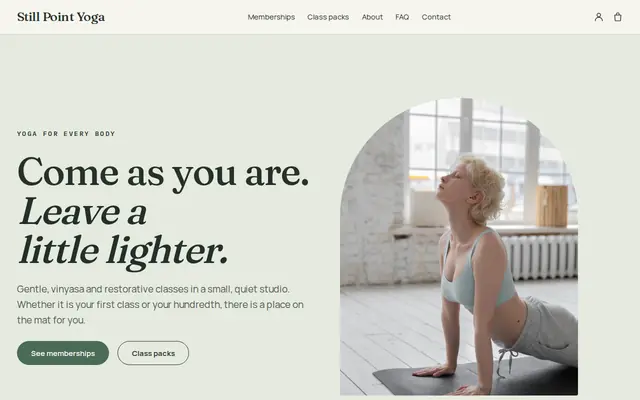
Made for Yoga studios, Pilates, Meditation
Serene and spacious for studios with classes and memberships.
Advice
Whatever you build it with, these are the things that turn visitors into customers.
Age first, then style, then level. The parent of a four-year-old should reach the right class in two clicks and see the day, the time and what to wear.
Registration opening, first class, breaks, picture day and the recital. Families plan around them, and one dates page saves you answering the same question many times.
Registration, tuition, costumes, recital tickets and exam fees in one place. Fees that appear halfway through the season upset families, so say up front when each one is due.
If you teach a syllabus, such as RAD, ISTD or Cecchetti ballet, say so and explain what exams involve. Parents who danced themselves often look for it.
If you film the recital to share or sell, check the rights to the music first. Recital routines often use commercial songs, and the rules for sharing a video differ from those for dancing to it.
How it works
A sentence or two is enough: what you do, who it’s for and how people buy from you.
Cornerrr writes your pages, adds your products or services, and picks the colours, fonts and look. It takes about a minute.
Link a Stripe account, or create one in a few minutes. Your customers pay you directly.
Publish on your free Cornerrr web address, or use your own. Change anything later by asking.
Payments
Payments go through your own Stripe account, straight to you. Your customers see the methods you turn on in Stripe that work for their country and currency.
Selling in Europe or the US? United States, United Kingdom, Germany, France, Netherlands, Ireland and every country we cover.
Pricing
Build and preview for free, no card needed. Every paid plan starts with a 14-day free trial, and Cornerrr adds no transaction fees.
Build your website and try everything before you go live.
$0free
Go live and start selling.
$19a month
Most popular
For growing businesses with subscriptions and deliveries.
$49a month
For several stores and bigger catalogues.
$99a month
Questions
Yes, through a registration request form. It lands in your Inbox with the dancer’s age and the classes they want, and you reply to confirm a place. Cornerrr doesn’t place dancers in classes automatically.
Make each performance a product with stock set to the number of seats. Buyers pay at checkout and get a confirmation email, and their names are in your Orders list for the door.
Yes. Monthly tuition is a subscription on the Growth plan, and costume or exam fees are one-off products that families pay when they’re due.
Yes. Ballet shoes, tights and studio T-shirts can be products with sizes and stock. Many studios list just the items on their dress code, so parents buy the right ones.
No. You describe your business in your own words and Cornerrr builds the website. Afterwards you change things by clicking, or by asking the assistant in plain words.
Building and previewing your website is free, with no card needed. To go live and take payments, choose a plan from $19 a month. Every paid plan starts with a 14-day free trial; a card is needed to start it.
Describe your business and see your website in about a minute. It’s free until you go live.