Preview
Build your website and try everything before you go live.
$0free
Website builder for pet food delivery businesses
Describe your pet food business and Cornerrr builds a pet food delivery website with repeat deliveries billed by Stripe, bag sizes and recipes as options, frozen raw food for your local area and one-off treats.

What you get
Cornerrr writes every page from your description, then you change anything by clicking or by asking.
The same bag on a schedule, billed by Stripe on the Growth plan, with recipe and bag size as options. Owners see their plan in their account and message you to change it.
Raw meals and frozen patties as products for your own delivery area, with stock per recipe so a sold-out batch stops at checkout.
One-time products with photos and stock, easy to add between deliveries. Ask the assistant to write their descriptions from your ingredient lists.
Breeders, rescues and boarding kennels buy in bulk. List bulk supply as price on request and quote from what they send: the food, the amount and how often.
Deliveries and subscriptions
Plans billed every week or month by Stripe, with one-off products and extras alongside.
Each food is one product with its bag sizes and recipes as options, each with its own price and stock, so owners find their pet’s exact food on one page.
Stripe bills each repeat delivery on its schedule through your own Stripe account, by card, Apple Pay, Google Pay or direct debit where Stripe supports it.
Cornerrr writes product descriptions from your ingredient and feeding notes, and adds alt text and tags. You check every line before it goes live.
Set fixed rates and the countries you ship dry food to, and describe your local area for frozen food on the Delivery page. Repeat plans carry delivery in their price.
Ready-made themes
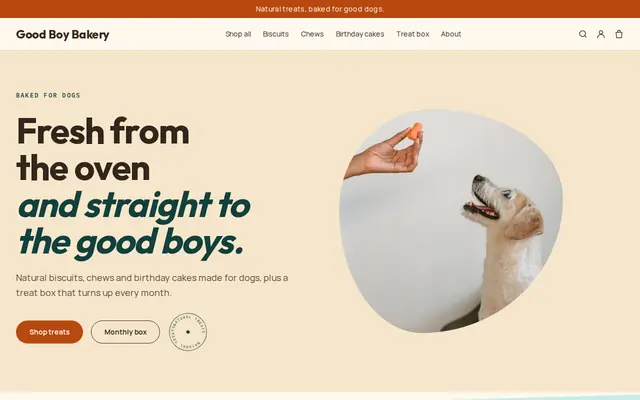
Made for Pet treats, Pet shops, Dog groomers
Fun and friendly for pet shops and pet services.
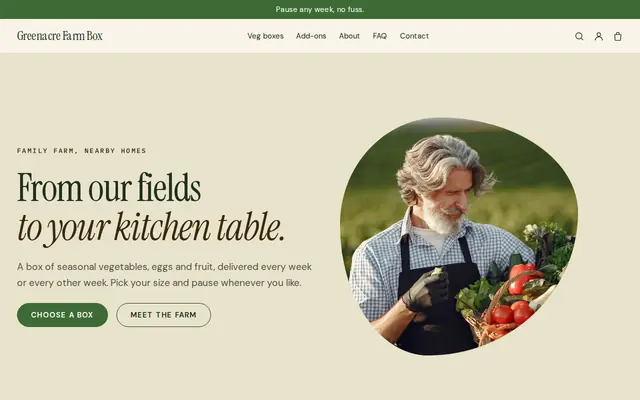
Made for Farm boxes, Meal kits, Local deliveries
Earthy and friendly for farm boxes, meal kits and deliveries that repeat.
Advice
Whatever you build it with, these are the things that turn visitors into customers.
Say how long each bag size lasts for a small, medium and large dog, using the feeding guide on the bag. Owners who choose the right schedule don’t run out or pile up bags.
Remind owners to change foods gradually over several days, and to ask their vet before changing the diet of a pet with health problems. Don’t make health claims for any food.
Say how raw food travels, whether someone must be home and how quickly it should go in the freezer. Handling advice, like washing hands and bowls after raw meals, belongs on the same page.
A photo of the kibble, the raw patty or the chew next to a hand for scale answers size questions that matter to owners of small dogs and cats.
If you make your own food or treats, most US states require pet food registration and labeling, and the EU and UK have feed rules too. Check before you sell your own recipes.
How it works
A sentence or two is enough: what you do, who it’s for and how people buy from you.
Cornerrr writes your pages, adds your products or services, and picks the colours, fonts and look. It takes about a minute.
Link a Stripe account, or create one in a few minutes. Your customers pay you directly.
Publish on your free Cornerrr web address, or use your own. Change anything later by asking.
Payments
Payments go through your own Stripe account, straight to you. Your customers see the methods you turn on in Stripe that work for their country and currency.
Selling in Europe or the US? United States, United Kingdom, Germany, France, Netherlands, Ireland and every country we cover.
Pricing
Build and preview for free, no card needed. Every paid plan starts with a 14-day free trial, and Cornerrr adds no transaction fees.
Build your website and try everything before you go live.
$0free
Go live and start selling.
$19a month
Most popular
For growing businesses with subscriptions and deliveries.
$49a month
For several stores and bigger catalogues.
$99a month
Questions
Yes, on the Growth plan. Each repeat delivery is a subscription that Stripe bills every two or four weeks, or on any schedule you set, through your own Stripe account. You get an email for each new sign-up.
They message you through your website or by email, and you change the subscription in your Stripe Dashboard. Customers can’t switch plans themselves yet, so put your contact details on the plan page.
Prescription diets usually need a vet’s authorization, and rules vary. Many small shops leave them out of the online store or list them as price on request, so they can check with the customer’s vet first.
No. Use collections for dog food, cat food and treats on one website, each with its own menu link. Cornerrr sets up the starting collections from your description.
No. You describe your business in your own words and Cornerrr builds the website. Afterwards you change things by clicking, or by asking the assistant in plain words.
Building and previewing your website is free, with no card needed. To go live and take payments, choose a plan from $19 a month. Every paid plan starts with a 14-day free trial; a card is needed to start it.
Describe your business and see your website in about a minute. It’s free until you go live.