Preview
Build your website and try everything before you go live.
$0free
Website builder for insurance agents
Describe the insurance you sell and where you’re licensed, and Cornerrr builds a page for each line of coverage, an About page for your agents and a short quote request form. Every quote then starts with a conversation.
What you get
Cornerrr writes every page from your description, then you change anything by clicking or by asking.
Home, auto, renters, life and small business, each explaining in plain words what the cover is for and what you’ll ask about on the call.
Name, contact details, the kind of insurance and a good time to call. Requests land in your Inbox, and the details are taken on the phone.
A page listing the companies you’re appointed with, using their names and logos as your agent agreements allow. Independent agents win clients on choice.
Existing clients can ask for a yearly review, or a change after a move, a new car or a new baby, through the same short form.
Professional services
Your services with prices, or “price on request” so clients ask first, and every request in your Inbox.
Every quote request lands by email and in your Inbox. Ask the assistant which of this week’s requests haven’t had a call back yet.
Add your license numbers, the states you’re licensed in and any required notices to the footer, and edit them by clicking.
Page titles, a sitemap and structured data for your business help searches like “home insurance agent in Omaha” find your pages, especially with your Google Business Profile linked.
Ready-made themes
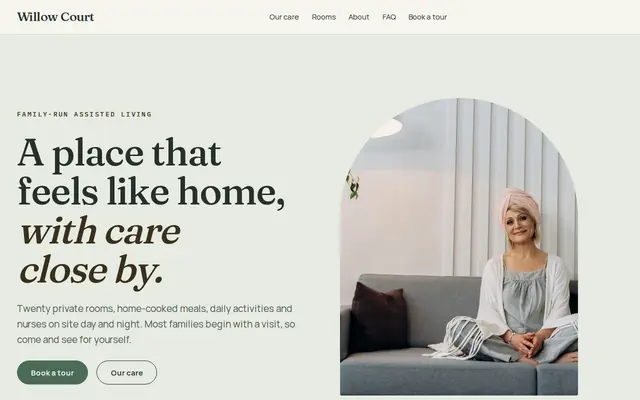
Made for Assisted living, Care homes, Home care
Calm and reassuring, with tour requests front and centre.
Advice
Whatever you build it with, these are the things that turn visitors into customers.
Many states ask agents to show a license number in their advertising. California, for example, requires it on business cards, written quotes and print ads. Check your state department of insurance for what applies online.
No Social Security numbers, driver’s license numbers, health details or claims history in a web form. Ask for contact details and the kind of cover, and take the rest on a call or through your agency system’s secure forms.
Carriers control how agents use their names and logos, and captive agents often need the company’s approval for any website. Ask your carrier’s marketing team before you publish.
Lines like “lowest rates anywhere” or “we’ll always cover your claim” can break state advertising rules, and they aren’t yours to promise. Describe what you do: compare carriers and explain the options.
UK brokers must say that they’re authorised and regulated by the Financial Conduct Authority, usually with their firm reference number in the website footer.
How it works
A sentence or two is enough: what you do, who it’s for and how people buy from you.
Cornerrr writes your pages, adds your products or services, and picks the colours, fonts and look. It takes about a minute.
Link a Stripe account, or create one in a few minutes. Your customers pay you directly.
Publish on your free Cornerrr web address, or use your own. Change anything later by asking.
Payments
Payments go through your own Stripe account, straight to you. Your customers see the methods you turn on in Stripe that work for their country and currency.
Selling in Europe or the US? United States, United Kingdom, Germany, France, Netherlands, Ireland and every country we cover.
Pricing
Build and preview for free, no card needed. Every paid plan starts with a 14-day free trial, and Cornerrr adds no transaction fees.
Build your website and try everything before you go live.
$0free
Go live and start selling.
$19a month
Most popular
For growing businesses with subscriptions and deliveries.
$49a month
For several stores and bigger catalogues.
$99a month
Questions
Not through Cornerrr. Insurance needs underwriting and licensed advice, so your website collects quote requests that land in your Inbox, and your agents follow up.
Keep it to a name, a phone number or email, the kind of insurance and a good time to call. Fewer fields get more requests, and you avoid holding personal data you don’t need yet.
Usually, yes. Most carriers have brand rules for appointed agents, and captive agents may need approval for the whole website. Check your agent agreement or ask the carrier’s marketing team.
No. You describe your business in your own words and Cornerrr builds the website. Afterwards you change things by clicking, or by asking the assistant in plain words.
Building and previewing your website is free, with no card needed. To go live and take payments, choose a plan from $19 a month. Every paid plan starts with a 14-day free trial; a card is needed to start it.
Describe your business and see your website in about a minute. It’s free until you go live.