Preview
Build your website and try everything before you go live.
$0free
Website builder for beauty salons
A beauty salon does a little of everything, and its website has to make that easy. Cornerrr groups your treatments by type, adds patch test notes where they matter, takes appointment requests and sells the skincare on your shelf.

What you get
Cornerrr writes every page from your description, then you change anything by clicking or by asking.
Waxing, threading, brows and lashes, facials, hands and feet, tanning: each group in its own part of the menu with prices and times, so a client after a brow tint doesn’t scroll past body waxing.
Clients ask for a treatment and say when suits them. The request reaches your Inbox and your email, and you confirm by reply, mentioning any patch test they need first.
Wedding, prom and vacation prep bundles, such as brows, tint, nails and tan, listed with what’s included. Clients ask for dates, and you plan the order of treatments so the tan goes on last.
The cleanser, serum and SPF you use in facials as products with sizes and stock, plus aftercare like post-wax lotion, paid through Stripe and shipped at your rates.
Beauty and wellbeing
Your services with prices, or “price on request” so clients ask first, and every request in your Inbox.
Cornerrr writes a short description of each treatment, what it involves and how to prepare, and the assistant rewrites any of them in a warmer or shorter voice when you ask.
Add a “Before your visit” page with your patch test rules, how long hair should grow before waxing and what to avoid before a tan. Edit it by clicking whenever your products change.
Treatment and package requests land in one Inbox and in your email, so nothing gets lost between the front desk and your phone.
On any paid plan, make discount codes for your skincare, with start and end dates, a minimum order or one use per customer.
Ready-made themes
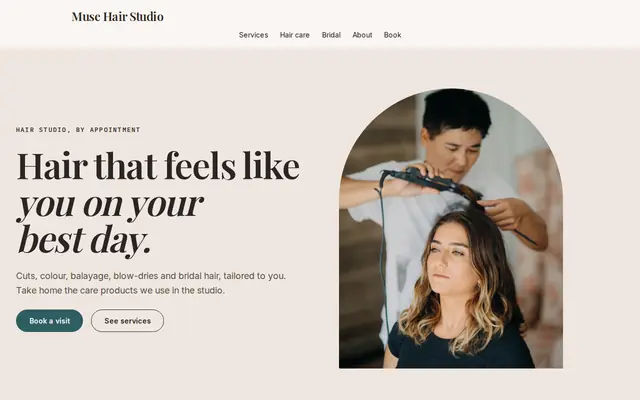
Made for Hair salons, Nail studios, Beauty rooms
Chic and friendly for salons that take bookings.
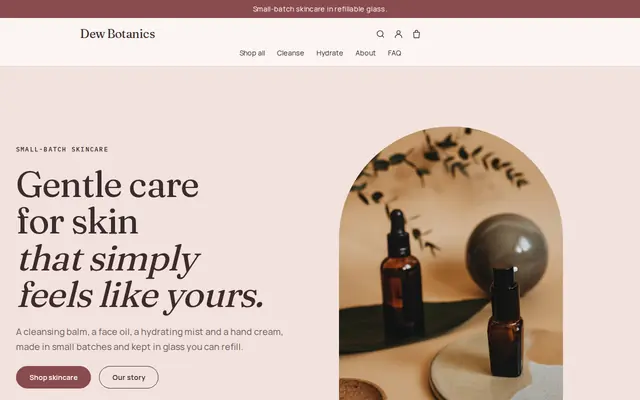
Made for Skincare, Bath and body, Natural beauty
Soft and minimal for skincare, candles and self-care brands.
Advice
Whatever you build it with, these are the things that turn visitors into customers.
Clients come for one thing: brows, legs, a facial. Group treatments by body area or type, put the most requested one first, and keep each name short and plain.
Lash and brow tints and some other treatments need a patch test before the first visit, often 24 to 48 hours ahead, as product makers advise. Saying so on the website saves turning a client away on the day.
A photo of a clean room, fresh towels and good lighting tells nervous first-timers what to expect, especially for waxing.
Brazilian wax, brow lamination, eyebrow threading, dermaplaning: name treatments the way clients type them, and add your town to the title of your treatment menu page.
If only one therapist does lash lifts or threading, say so. Clients then ask for the right person, and you avoid swapping appointments around later.
How it works
A sentence or two is enough: what you do, who it’s for and how people buy from you.
Cornerrr writes your pages, adds your products or services, and picks the colours, fonts and look. It takes about a minute.
Link a Stripe account, or create one in a few minutes. Your customers pay you directly.
Publish on your free Cornerrr web address, or use your own. Change anything later by asking.
Payments
Payments go through your own Stripe account, straight to you. Your customers see the methods you turn on in Stripe that work for their country and currency.
Selling in Europe or the US? United States, United Kingdom, Germany, France, Netherlands, Ireland and every country we cover.
Pricing
Build and preview for free, no card needed. Every paid plan starts with a 14-day free trial, and Cornerrr adds no transaction fees.
Build your website and try everything before you go live.
$0free
Go live and start selling.
$19a month
Most popular
For growing businesses with subscriptions and deliveries.
$49a month
For several stores and bigger catalogues.
$99a month
Questions
A home page, a treatment menu with prices, a page about patch tests and preparation, a contact page with your hours and address, and a shop if you sell products. Cornerrr builds these from a short description of your salon.
Yes. Clients send a request through the form on your website; it lands in your Inbox and by email, and you confirm the time by reply. Nothing goes in your schedule until you say yes.
Yes. Add products with photos, sizes, stock and prices; customers pay by card or wallet through your own Stripe account. You set fixed shipping rates and add tracking numbers when you ship orders.
Yes. Show prices for standard treatments and mark bespoke ones, such as bridal packages, “price on request”: their price and cart button are hidden, and clients send you the details instead.
No. You describe your business in your own words and Cornerrr builds the website. Afterwards you change things by clicking, or by asking the assistant in plain words.
Building and previewing your website is free, with no card needed. To go live and take payments, choose a plan from $19 a month. Every paid plan starts with a 14-day free trial; a card is needed to start it.
Describe your business and see your website in about a minute. It’s free until you go live.