Preview
Build your website and try everything before you go live.
$0free
Website builder for barbers
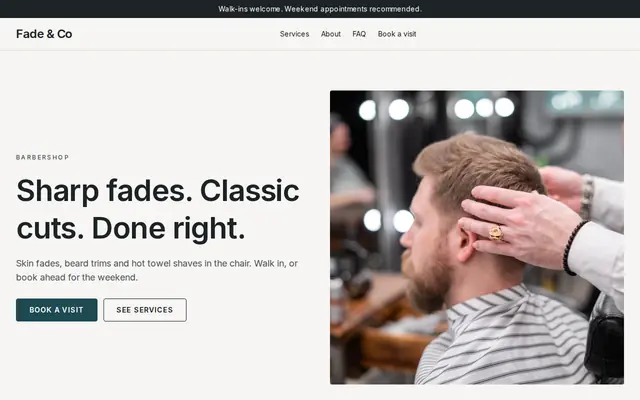
Tell Cornerrr about your shop and it builds a site with your cuts and prices, your barbers, your hours and whether you take walk-ins, plus a shop for beard oil and pomade. Regulars can even pay for a monthly cut plan.
What you get
Cornerrr writes every page from your description, then you change anything by clicking or by asking.
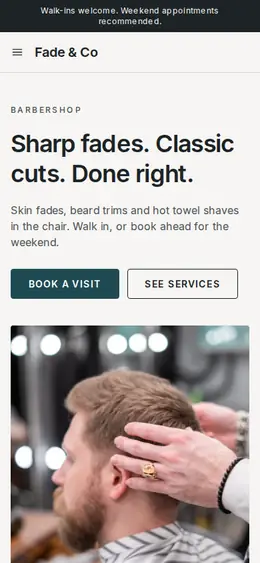
Skin fade, scissor cut, beard trim, hot towel shave, kids’ cut: each with its price and roughly how long it takes, on one page that reads well on a phone held in one hand.
Say which days you take walk-ins and when you work by appointment. For the busy days, clients send a request with the cut and the time they’d like, and you confirm it by email.
A cut every two weeks, or a monthly cut and beard trim, billed automatically by Stripe on the Growth plan. Members see their plan in their account, and you keep track of the cuts in the shop.
Beard oil, balm, pomade, clay and combs as products with scents and sizes as options, so regulars can restock between visits and have them shipped.
Beauty and wellbeing
Your services with prices, or “price on request” so clients ask first, and every request in your Inbox.
Start from a barber theme with strong type and dark colors, or pick one of the three designs Cornerrr makes for your shop, then change colors and fonts by asking the assistant.
Give each barber a section with their best cuts and the days they work, so clients ask for the right chair. Edit it by clicking when the schedule changes.
On the Growth plan, Stripe bills members on the schedule you set, with free trial days if you want them. Members see their plan when they sign in with a code sent by email.
Put your hours, address and phone number where everyone sees them. Cornerrr adds page titles, descriptions and structured data for your business, which matters when someone searches for a barber on the way home.
Ready-made themes
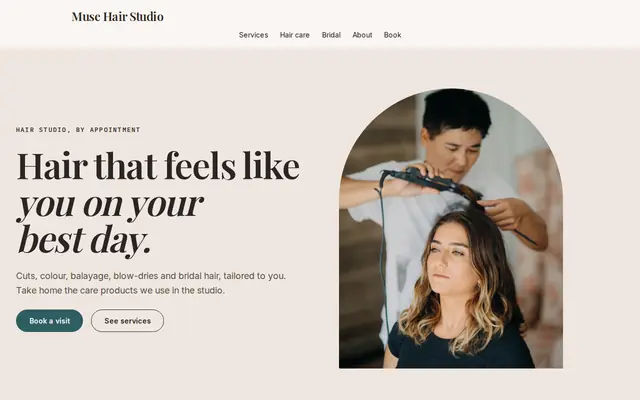
Made for Hair salons, Nail studios, Beauty rooms
Chic and friendly for salons that take bookings.
Advice
Whatever you build it with, these are the things that turn visitors into customers.
Side, back and top under the same light. A clean fade shot from behind sells better than a smiling selfie, because it shows the blend people are searching for.
Say which days you take walk-ins, the time you stop taking them, and that Saturdays fill early. People decide whether to walk over based on that one line.
Low taper, mid fade, buzz cut, line-up: use the words clients use, not just “gents’ cut”. They’re also the words people type into a search box.
Parents look for a barber who is patient with children. If you do first haircuts, quieter times for nervous kids or a kids’ price, put it on the home page.
In the US, barbers are licensed by the state, and customers notice when a shop says so. Add your licensing and how you clean clippers and combs between clients to your About page.
How it works
A sentence or two is enough: what you do, who it’s for and how people buy from you.
Cornerrr writes your pages, adds your products or services, and picks the colours, fonts and look. It takes about a minute.
Link a Stripe account, or create one in a few minutes. Your customers pay you directly.
Publish on your free Cornerrr web address, or use your own. Change anything later by asking.
Payments
Payments go through your own Stripe account, straight to you. Your customers see the methods you turn on in Stripe that work for their country and currency.
Selling in Europe or the US? United States, United Kingdom, Germany, France, Netherlands, Ireland and every country we cover.
Pricing
Build and preview for free, no card needed. Every paid plan starts with a 14-day free trial, and Cornerrr adds no transaction fees.
Build your website and try everything before you go live.
$0free
Go live and start selling.
$19a month
Most popular
For growing businesses with subscriptions and deliveries.
$49a month
For several stores and bigger catalogues.
$99a month
Questions
Yes, because most people check hours, prices and directions online before they walk over. A simple site with your cuts, hours and address answers that, and lets regulars send requests for your busiest days.
Yes. Add them as products with scents and sizes, and Cornerrr tracks stock and takes payment through your own Stripe account. You set fixed shipping rates, and customers get an email with a tracking link when you add one.
On the Growth plan you create a plan, such as two cuts a month, and Stripe bills members automatically. You keep track of how many cuts each member has used, and members contact you to change or cancel.
Customers can name the barber they want in their appointment request, and you see it in your Inbox. Most shops also add a short profile for each barber so new customers know who does what.
No. You describe your business in your own words and Cornerrr builds the website. Afterwards you change things by clicking, or by asking the assistant in plain words.
Building and previewing your website is free, with no card needed. To go live and take payments, choose a plan from $19 a month. Every paid plan starts with a 14-day free trial; a card is needed to start it.
Describe your business and see your website in about a minute. It’s free until you go live.