Preview
Build your website and try everything before you go live.
$0free
Website builder for market vendors
Describe what you grow or make and where you sell it, and Cornerrr builds a market vendor website with your market schedule, products that ship, set-aside requests for your stall and a Stripe checkout, so regulars can find you all week.
What you get
Cornerrr writes every page from your description, then you change anything by clicking or by asking.
Which markets, which days, where your stall is and when the season starts and ends. Put it on the home page; it’s the first thing regulars and new customers look for.
Honey, jams, sauces, dried goods and crafts with photos, sizes as options and stock. They travel well and bring in orders on the days you’re not at market.
Regulars send what they’d like you to keep for the next market. It lands in your Inbox and you reply to confirm, so the last dozen eggs go to someone who asked.
A holiday honey trio or a summer preserves box as one product with its own stock, for customers who want to send your food as a present.
Shops and makers
Products with photos, options, prices and stock, a cart and a Stripe checkout.
Set stock to what you have this week and checkout stops when it runs out. When a crop is over for the year, set its stock to zero until it comes back.
Set-aside, wholesale and catering requests arrive in your Inbox and by email, instead of scattered across texts, notes and conversations at the stall.
Fixed shipping rates with delivery estimates for jars and dry goods, and the countries you ship to. Fresh produce can stay market-only, which you say in its description.
Collect emails with double opt-in from your website and export them to your email tool, ready for the week the first strawberries arrive.
Ready-made themes
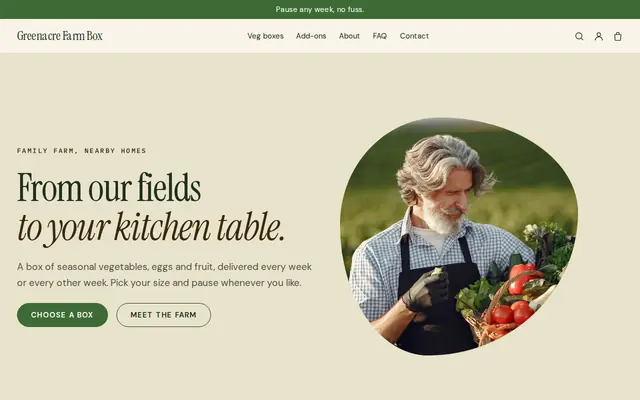
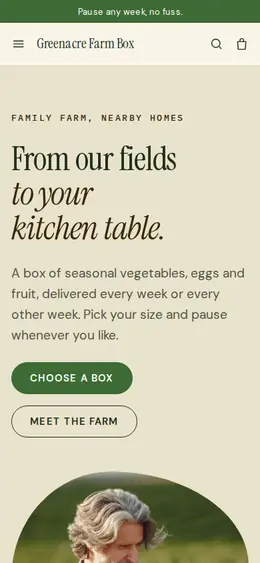
Made for Farm boxes, Meal kits, Local deliveries
Earthy and friendly for farm boxes, meal kits and deliveries that repeat.
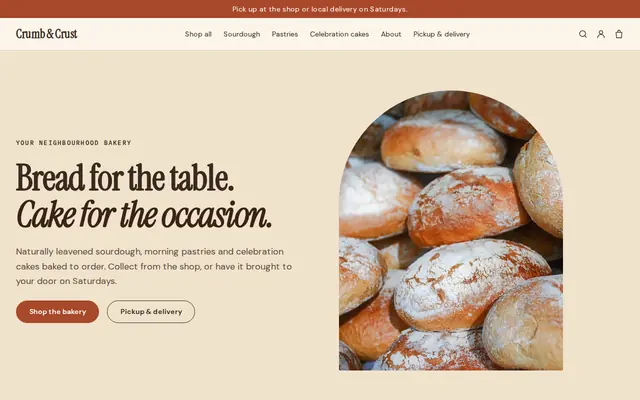
Made for Bakeries, Cafés, Cake makers
Warm and hand-made, with room for daily bakes and cakes to order.
Advice
Whatever you build it with, these are the things that turn visitors into customers.
Jams, baked goods and sauces made at home often fall under cottage food rules, which can limit where and how you sell, including online and across state lines. Check with your state or local food authority before you ship.
Weather cancellations, holiday markets and the end of the season all change your schedule. Update it every week; regulars check before they drive over.
Add it to your price signs, jar labels and a card in every bag. People who loved your honey on Saturday will look for it on Wednesday.
A photo of your table at the market helps people find you among dozens of stalls. Add one of your farm or kitchen too, so they can see where the food comes from.
Ingredients, allergens, where it’s from and how to store it. Food labeling rules can apply to online listings as well as to the jar, so check what your area requires.
How it works
A sentence or two is enough: what you do, who it’s for and how people buy from you.
Cornerrr writes your pages, adds your products or services, and picks the colours, fonts and look. It takes about a minute.
Link a Stripe account, or create one in a few minutes. Your customers pay you directly.
Publish on your free Cornerrr web address, or use your own. Change anything later by asking.
Payments
Payments go through your own Stripe account, straight to you. Your customers see the methods you turn on in Stripe that work for their country and currency.
Selling in Europe or the US? United States, United Kingdom, Germany, France, Netherlands, Ireland and every country we cover.
Pricing
Build and preview for free, no card needed. Every paid plan starts with a 14-day free trial, and Cornerrr adds no transaction fees.
Build your website and try everything before you go live.
$0free
Go live and start selling.
$19a month
Most popular
For growing businesses with subscriptions and deliveries.
$49a month
For several stores and bigger catalogues.
$99a month
Questions
Not through checkout, which has no collection option. Customers send a set-aside request with what they want and which market, you confirm by email, and they settle up at your stall the way they always do.
It helps. People look you up after they’ve tasted something, and a website with your market days, what you sell and a way to order jars by post keeps them buying between visits.
Yes, on the Growth plan, as a subscription billed by Stripe every week or month. Say clearly how members get their share, and arrange delivery or collection with them directly.
Yes. Add a wholesale page with “price on request” items. Chefs and shop owners send the quantities they need, and you reply with prices and delivery days.
No. You describe your business in your own words and Cornerrr builds the website. Afterwards you change things by clicking, or by asking the assistant in plain words.
Building and previewing your website is free, with no card needed. To go live and take payments, choose a plan from $19 a month. Every paid plan starts with a 14-day free trial; a card is needed to start it.
Describe your business and see your website in about a minute. It’s free until you go live.