Preview
Build your website and try everything before you go live.
$0free
Website builder for cooking teachers
Describe your kitchen and the classes you run, and Cornerrr builds your cooking class website: dated classes with seats as stock, a menu for each class, requests for private and team events, and a clear page about allergies.
What you get
Cornerrr writes every page from your description, then you change anything by clicking or by asking.
Each class date as a product, with the menu in the description and stock set to the stations in your kitchen. Checkout stops when it’s full.
Birthday dinners, bachelorette parties and company team building listed without a price. Groups send the date, the group size and any dietary needs, and you reply with a menu and a quote.
A week of summer cooking for kids as a product, with ages as options and stock for each age group, so a full group closes on its own.
Your recipes as digital downloads on any paid plan, or as printed booklets sent with the shipping rates you set.
Fitness, lessons and classes
Your services with prices, or “price on request” so clients ask first, and every request in your Inbox.
Cornerrr writes each class page with what you’ll cook, the skill level, how long it lasts and whether everyone eats together at the end.
Ask the assistant to add a line about allergens, vegetarian options and what guests should tell you in advance to every class at once.
Companies buying seats for a team can enter a tax ID at checkout, and each one-time order comes with an invoice for their accounts.
Ready-made themes
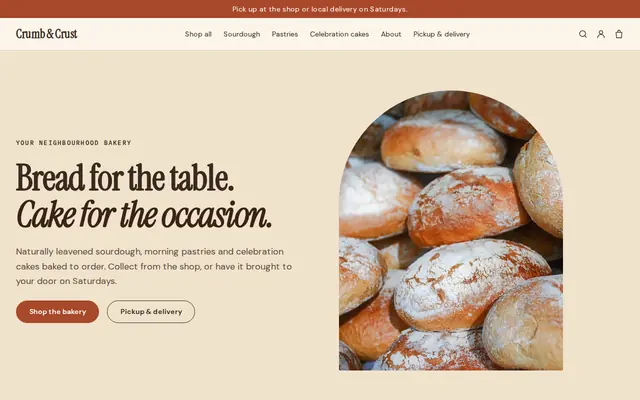
Made for Bakeries, Cafés, Cake makers
Warm and hand-made, with room for daily bakes and cakes to order.
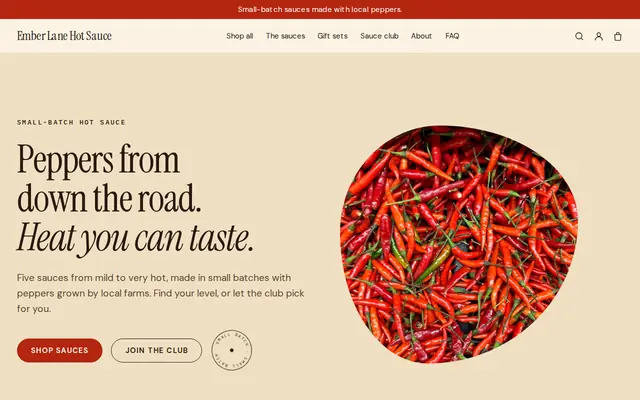
Made for Sauces and condiments, Snacks, Food gifts
Loud, playful and colourful for food makers with personality.
Advice
Whatever you build it with, these are the things that turn visitors into customers.
A table of finished dishes and hands in the dough do more than a photo of an empty kitchen. Photograph each menu the first time you teach it.
Say which allergens are used in your kitchen, and if you can’t promise an allergen-free class, say that too. Ask guests with severe allergies to email you before they buy a seat.
Does everyone cook at their own station, or watch a demonstration and taste? People choosing a class for a night out care which one it is.
If wine is part of the evening, check your local licensing rules before you mention it on the website or include it in the price.
Weekend classes often fill first while weekdays stay quiet. A clear private events page gives companies and groups a reason to take the evenings classes don’t fill.
How it works
A sentence or two is enough: what you do, who it’s for and how people buy from you.
Cornerrr writes your pages, adds your products or services, and picks the colours, fonts and look. It takes about a minute.
Link a Stripe account, or create one in a few minutes. Your customers pay you directly.
Publish on your free Cornerrr web address, or use your own. Change anything later by asking.
Payments
Payments go through your own Stripe account, straight to you. Your customers see the methods you turn on in Stripe that work for their country and currency.
Selling in Europe or the US? United States, United Kingdom, Germany, France, Netherlands, Ireland and every country we cover.
Pricing
Build and preview for free, no card needed. Every paid plan starts with a 14-day free trial, and Cornerrr adds no transaction fees.
Build your website and try everything before you go live.
$0free
Go live and start selling.
$19a month
Most popular
For growing businesses with subscriptions and deliveries.
$49a month
For several stores and bigger catalogues.
$99a month
Questions
Add each class date as a product with stock set to the number of stations. Guests pay at checkout, stock goes down with each seat, and the class stops selling when it’s full.
Yes. List team building as “price on request”. Companies send the date, group size and any dietary needs through the form, and you reply by email with a menu and a quote.
Yes, on any paid plan. Upload a PDF recipe booklet and set a price, and buyers get the file after payment and can find it again in their account.
Refund the orders, and each guest gets a refund email from your website. Say on your FAQ page what happens if you cancel and how much notice guests need to give.
No. You describe your business in your own words and Cornerrr builds the website. Afterwards you change things by clicking, or by asking the assistant in plain words.
Building and previewing your website is free, with no card needed. To go live and take payments, choose a plan from $19 a month. Every paid plan starts with a 14-day free trial; a card is needed to start it.
Describe your business and see your website in about a minute. It’s free until you go live.