Preview
Build your website and try everything before you go live.
$0free
Website builder for art schools and ateliers
Describe your school, its terms and who it teaches, and Cornerrr builds an art school website: term courses and workshops with the places counted, a portfolio course, materials kits and a faculty page. Tuition is paid into the school’s own Stripe account.

What you get
Cornerrr writes every page from your description, then you change anything by clicking or by asking.
Each course is a product, and the class day or level is an option with its own number of places. Every paid enrollment takes one away, the page shows “Only 2 left” as the class fills and “Sold out” when it is full, and checkout stops there.
A weekend workshop or a visiting artist’s masterclass is its own product, with the date in the title and stock set to the easels in the studio. Take it off the website once it has run.
Sell the portfolio course by the term like any other. If the school prefers to speak to each applicant first, hide the price, and families send a request that lands in the Inbox for the office to answer.
The kit for each course is a product a student adds to the same order as the course. Cornerrr doesn’t supply or send anything, so the school holds the kits and hands them out at the first class, or ships them at the rates it sets.
Schools, clubs and organizations
Products with photos, options, prices and stock, a cart and a Stripe checkout.
Any word on the storefront can be changed in Settings → Language. “Add to cart” can read “Enroll”, so the website sounds like a school office and not like a shop.
Add up to three questions at checkout, each a short text, a number or a dropdown: the student’s name when a parent pays, or their experience level. The questions apply to every order, and the answers are saved with the order and printed on its packing slip.
Students pay by card, Apple Pay or Google Pay, and in the US by ACH Direct Debit if the school turns it on in Stripe. The money goes to the school’s own Stripe account. Cornerrr adds no fee per sale, and Stripe’s own processing fees apply.
On any paid plan, make a discount code with a start date, an end date and a usage limit. One code can reward enrolling before a deadline, and another can go to students who continue from the term before.
Ready-made themes
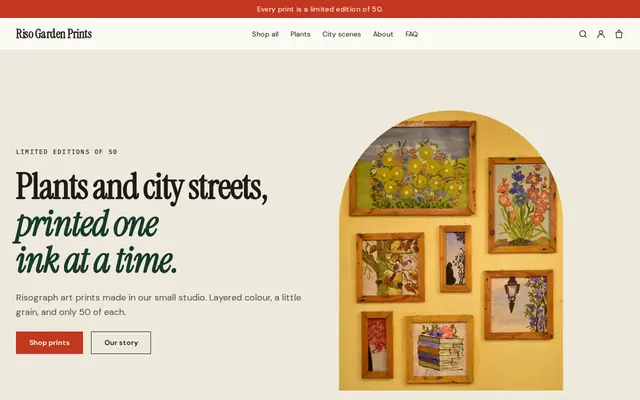
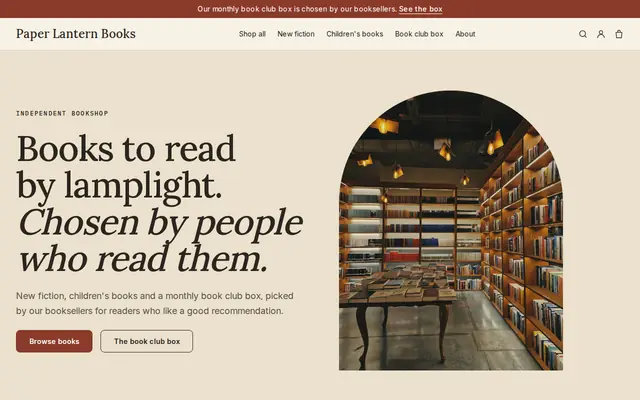
Made for Bookshops, Stationers, Record shops
Bookish and characterful for bookshops and stationers.
Advice
Whatever you build it with, these are the things that make people enroll, join and order.
The day enrollment opens, the first and last week of term and the weeks without classes. Returning students look for these before they look at a single course.
Students often choose a painting course by who teaches it. Put the instructor’s name, a short biography and two or three of their own pieces on the course page.
Say what the school supplies, what students bring and what the kit contains, with brands and sizes. A complete list saves the front desk from answering the same email all through enrollment.
Give the grade or age it suits, how many finished pieces students leave with and when college deadlines fall. Describe the work students do, and leave out any promise about admission.
Decide what happens when a student withdraws in the second week, and when the school cancels a course that didn’t fill. Link the policy from every course page, so the answer is the same whoever picks up the phone.
End-of-term exhibitions give an art school its best photos. Get permission from each student, and from a parent for anyone under 18, before their work or face goes on the website.
How it works
A sentence or two is enough: who you are, what you sell and who buys it.
Cornerrr writes your pages, adds your classes, memberships or products, and picks the colors, fonts and look. It takes about a minute.
Link your own Stripe account, or create one in a few minutes. Payments go straight to it, and Cornerrr adds no fee per sale.
Publish on your free Cornerrr web address, or use your own. Change anything later by asking.
Payments
Payments go through your own Stripe account, straight to you. Your customers see the methods you turn on in Stripe that work for their country and currency.
Selling in Europe or the US? United States, United Kingdom, Germany, France, Netherlands, Ireland and every country we cover.
Pricing
Build and preview for free, no card needed. Every paid plan starts with a 14-day free trial, and Cornerrr adds no transaction fees.
Build your website and try everything before you go live.
$0free
Go live and start selling.
$19a month
Most popular
For growing businesses with subscriptions and deliveries.
$49a month
For several stores and bigger catalogs.
$99a month
Questions
Yes. Each course is a product with the class day or level as options, and stock is the number of places. Students pay at checkout, a place is taken with each paid order, and the course shows “Sold out” when it is full.
The page shows “Sold out” and checkout stops. Cornerrr keeps no list of people who wanted a place, so add a line asking them to email the office, and raise the stock if you open another section.
Every paid order is in Orders with the buyer’s name, email, the course and option chosen and the answers to your checkout questions. Cornerrr doesn’t build class rosters or take attendance, so the office keeps its own class lists from those orders.
Yes. A kit is a product next to the course, and a student can buy both in one order. The school holds the kits itself and hands them out at the first class, or ships them at fixed rates it sets on any paid plan.
No. Cornerrr adds no fee per sale. Tuition goes to the school’s own Stripe account, and Stripe’s own processing fees apply. The website is free to build and preview with no card, and going live needs a paid plan.
No. You describe your organization in your own words and Cornerrr builds the website. Afterwards you change things by clicking, or by asking the assistant in plain words.
Building and previewing your website is free, with no card needed. To go live and take payments, choose a plan from $19 a month. Every paid plan starts with a 14-day free trial; a card is needed to start it. Cornerrr adds no fee per sale.
Describe your organization and see your website in about a minute. It’s free until you go live.