Preview
Build your website and try everything before you go live.
$0free
Website builder for med spas
People choose a med spa on trust: who performs the treatment, and how plainly the risks are explained. Cornerrr builds a med spa website with pages for your treatments and practitioners, and a consultation request instead of a buy button.

What you get
Cornerrr writes every page from your description, then you change anything by clicking or by asking.
Each treatment explained in neutral words: what it is, who performs it, how long it takes, what recovery usually involves, and that a consultation decides whether it’s right for someone. No results promised.
Every treatment is “price on request”, with a consultation form instead of a cart button. Requests land in your Inbox and by email, and your team replies to arrange the visit.
A page with each practitioner’s role, qualifications and license, and your medical director, so clients can see who will treat them before they get in touch.
The cleansers, serums and sunscreens you stock as products with sizes and stock, paid through your own Stripe account and shipped at your rates.
Beauty and wellbeing
Your services with prices, or “price on request” so clients ask first, and every request in your Inbox.
Mark any treatment “price on request” and its price and cart button disappear, so nobody pays for a treatment before a practitioner has assessed them.
Cornerrr drafts every page, and the assistant only suggests changes, which you apply or undo. Ask it to make a treatment page plainer or remove a claim, then review it with your medical director.
Each consultation request arrives by email and in your Inbox, so the front desk can reply quickly, and the assistant can tell you which requests are still open.
Cornerrr drafts privacy, refund and terms pages for your shop. They’re drafts, not legal advice, so have them reviewed by someone who knows medical practices.
Ready-made themes
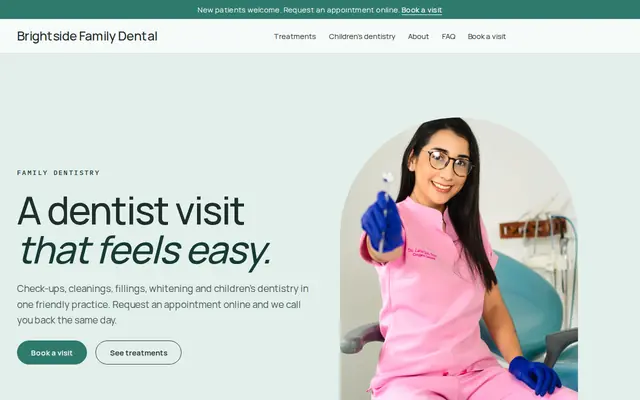
Made for Dentists, Clinics, Opticians
Clean and trustworthy for clinics that take appointment requests.
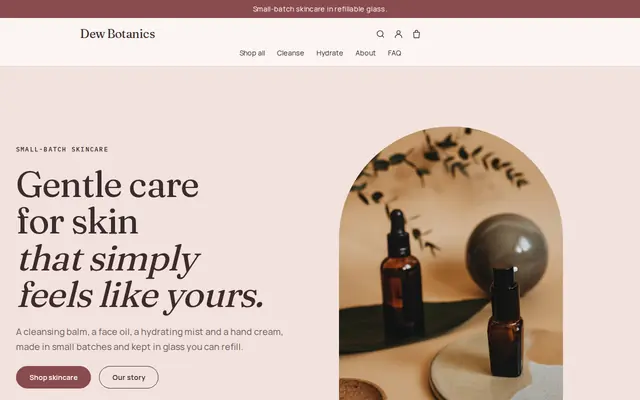
Made for Skincare, Bath and body, Natural beauty
Soft and minimal for skincare, candles and self-care brands.

Made for Jewellers, Watchmakers, Luxury goods
Refined and luxurious for jewellery and premium goods.
Advice
Whatever you build it with, these are the things that turn visitors into customers.
Say who performs each treatment and their role: physician, nurse practitioner, registered nurse, physician assistant, esthetician. Rules on who may inject and who must supervise differ by state and country, so check yours.
Medical aesthetics advertising is regulated. In the US, the FTC and state medical boards expect claims to be truthful and backed up; in the UK, prescription-only medicines such as botulinum toxin can’t be advertised to the public. Read your regulator’s guidance first.
Use real, unretouched photos with written consent, the same light and angle, and a line saying results vary. Some regulators restrict them, so check before you post any.
Collect medical history, medications and photos of concerns at the consultation or through your clinic’s secure intake system, not in a website form. The website form only needs a name, contact details and the treatment of interest.
Say what happens at a consultation, how long it takes, whether there’s a charge, and that the practitioner may advise against a treatment. Clients who know this arrive with realistic expectations.
How it works
A sentence or two is enough: what you do, who it’s for and how people buy from you.
Cornerrr writes your pages, adds your products or services, and picks the colours, fonts and look. It takes about a minute.
Link a Stripe account, or create one in a few minutes. Your customers pay you directly.
Publish on your free Cornerrr web address, or use your own. Change anything later by asking.
Payments
Payments go through your own Stripe account, straight to you. Your customers see the methods you turn on in Stripe that work for their country and currency.
Selling in Europe or the US? United States, United Kingdom, Germany, France, Netherlands, Ireland and every country we cover.
Pricing
Build and preview for free, no card needed. Every paid plan starts with a 14-day free trial, and Cornerrr adds no transaction fees.
Build your website and try everything before you go live.
$0free
Go live and start selling.
$19a month
Most popular
For growing businesses with subscriptions and deliveries.
$49a month
For several stores and bigger catalogues.
$99a month
Questions
Treatment pages in neutral words, profiles of your licensed practitioners and medical director, how consultations work, your address and hours, and a way to request a consultation. Cornerrr builds these pages, and you review every word.
They request a consultation instead. Treatments are listed as “price on request”, the request lands in your Inbox and by email, and your team arranges the visit. Nothing is booked or paid until a practitioner has seen them.
You can add your own photos to any page, but check your medical board’s or regulator’s rules first, get written consent and avoid retouching. The rules differ between countries and states.
They shouldn’t. Cornerrr’s request form is meant for a name, contact details and the treatment someone is interested in. Collect medical history at the consultation or through a system built for patient records.
No. You describe your business in your own words and Cornerrr builds the website. Afterwards you change things by clicking, or by asking the assistant in plain words.
Building and previewing your website is free, with no card needed. To go live and take payments, choose a plan from $19 a month. Every paid plan starts with a 14-day free trial; a card is needed to start it.
Describe your business and see your website in about a minute. It’s free until you go live.