Care and health · Brightside
Brightside, a friendly dental website template for families
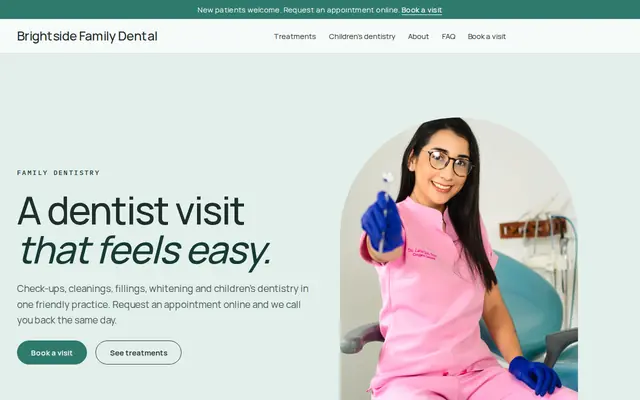
Brightside is a dental website template for a family practice: check-ups, cleanings, fillings, whitening and children’s visits, each with a request button, and a Book a visit page that explains what happens next. Start with it under your practice’s name.
- Free to build and preview
- Payments by Stripe
- No transaction fees from Cornerrr
About this theme
Brightside Clean and trustworthy for clinics that take appointment requests.
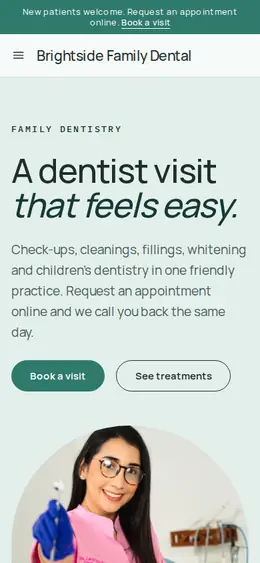
Brightside suits dental practices, small clinics and opticians who want to look clean and trustworthy without feeling clinical. Teal and mint on a near-white background, a friendly sans-serif and plenty of space keep it calm. Most of all, it takes the worry out of booking: a three-step “send a request, we call you back, visit us” section, treatments listed without prices so nobody is put off, and a story section on children’s dentistry that speaks to parents.
- Made for
- Dentists, Clinics, Opticians
- Feel
- Calm: quiet and spacious
- Comes with
- 4 pages, 4 sample services
- Mood
- calm, reassuring, friendly, clean
- background
- foreground
- primary
- accent
- muted
What’s inside
Every page, already written.
Home
A photo hero with two buttons, a line on how you care, booking in three steps, four treatments, a section for children, the appointment request form and three short answers.
About
A story section on the practice and what you offer, and a closing line about patients leaving a little more confident to smile.
FAQ
How to request an appointment, what to mention, booking for a child and which treatments you offer. Add your hours, payment notes and how urgent problems are handled.
Book a visit
The appointment request form: name, email, phone and what the visit is for. Requests reach your Inbox and email, and your team calls or writes back to set the time.
How it works
From a few words to your own Brightside website, live.
Step 1: Describe your business
A sentence or two is enough: what you do, who it’s for and how people buy from you.
Step 2: We build it while you watch
Cornerrr writes your pages, adds your products or services, and picks the colours, fonts and look. It takes about a minute.
Step 3: Connect payments
Link a Stripe account, or create one in a few minutes. Your customers pay you directly.
Step 4: You’re live
Publish on your free Cornerrr web address, or use your own. Change anything later by asking.
Questions
Good to know
Does Brightside let patients pick an appointment time?
No. Patients send a request with what they need, it arrives in your Inbox and by email, and your team calls back to arrange a time. The sample promises a same-day call back; keep that line only if your front desk can keep it.
What shouldn’t a dental website form ask?
Medical history, medications or details about symptoms. Ask for a name, contact details and the kind of visit, and take the rest by phone or at the practice.
Can I use Brightside for an optician or a small clinic?
Yes. Rename the treatments to eye tests, contact lens fittings or your clinic’s services, and ask the assistant to rewrite the words. Check your professional body’s advertising rules before you describe any treatment.
Are Brightside’s treatments shown with prices?
No, they’re price on request, so patients ask instead of comparing numbers. You can give any treatment a price, such as a fixed whitening fee, and patients then pay for it at Stripe checkout.
Brightside suits
- Dental practice website builder
- Optometrist website builder
- Chiropractor website builder
- Acupuncture clinic website builder
- Nursing home website builder
- Physical therapy clinic website builder
- Speech therapist website builder
- Med spa website builder
- Home inspector website builder
Make Brightside yours.
Start with this theme and Cornerrr builds your website from it with your own name. Free until you go live.