Beauty and wellbeing · Fade
Fade, a barber shop website template with clean lines
Walk-ins most days, bookings on the weekend: Fade is a barber shop website template for skin fades, classic cuts, beard trims and hot towel shaves, with a short request form for busy days. Start with it under your shop’s name.
- Free to build and preview
- Payments by Stripe
- No transaction fees from Cornerrr
About this theme
Fade Bold and dark for barbers and grooming.
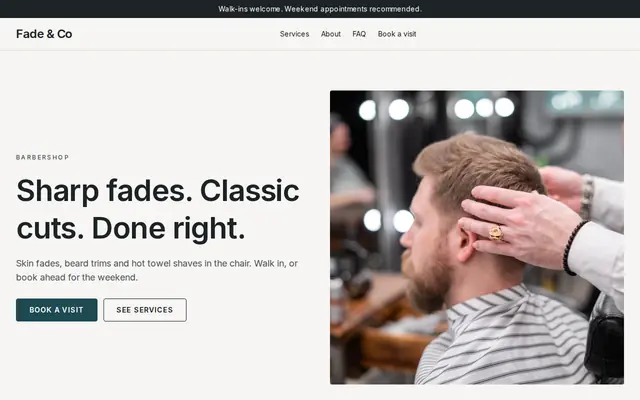
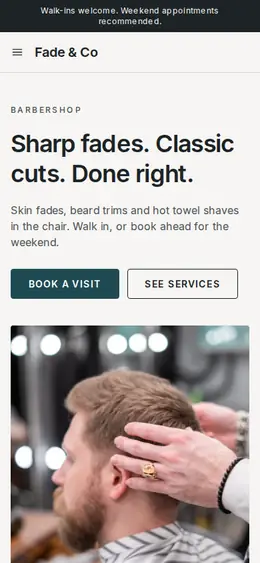
Fade suits barbers, tattoo studios and grooming rooms that want a confident, classic look: deep teal and sand with a crisp sans-serif, uppercase buttons and a photo hero. The hero answers the first question straight away: walk in or book? The home page explains both, lists the four services, and ends at a short request form for the service and the day. Short pages and few words suit a shop where people decide fast.
- Made for
- Barbers, Tattoo studios, Grooming
- Feel
- Practical: clear and efficient
- Comes with
- 4 pages, 4 sample services
- Mood
- crisp, classic, confident, welcoming
- background
- foreground
- primary
- accent
- muted
What’s inside
Every page, already written.
Home
A big photo hero (“Sharp fades. Classic cuts. Done right.”), how a visit works (walk in, book ahead, leave sharp), the services, an in-the-chair block, the request form and three quick answers.
About
One short page on a barbershop built on the basics: the four services, walk-ins welcome and weekend booking advised, with a button to book.
FAQ
Walk-ins, weekend booking, what you do and combining a cut with a beard trim. Add your opening hours and how long each service takes.
Contact
The “Book a visit” form with phone number and preferred day. Each request shows up in your Inbox and email, and you confirm by reply.
How it works
From a few words to your own Fade website, live.
Step 1: Describe your business
A sentence or two is enough: what you do, who it’s for and how people buy from you.
Step 2: We build it while you watch
Cornerrr writes your pages, adds your products or services, and picks the colours, fonts and look. It takes about a minute.
Step 3: Connect payments
Link a Stripe account, or create one in a few minutes. Your customers pay you directly.
Step 4: You’re live
Publish on your free Cornerrr web address, or use your own. Change anything later by asking.
Questions
Good to know
Can customers book a chair on the Fade template?
They send a request with the service and the day they want; it arrives in your Inbox and you confirm by email or phone. For walk-ins, put your opening hours and your busiest times on the home page.
Should a barber show prices on the website?
Most customers like to know before they sit down. Fade lists services as price on request, but you can add a price to each one in a minute, and the request form on the contact page still works for weekend bookings.
Can a tattoo studio use Fade?
Yes. Rename the services to consultations, flash and custom pieces, ask for placement and size in the request form’s message, and add photos of your own work. The bold look suits a studio as well as a shop.
Fade suits
- Barber shop website builder
- Tattoo studio website builder
- Hair braiding salon website builder
- Gym website builder
- Boxing gym website builder
- Videographer website builder
- DJ website builder
- Musician website builder
- Escape room website builder
Selling with Fade
More themes for beauty and wellbeing
- MuseHair salons, Nail studios, Beauty rooms
- DewSkincare, Bath and body, Natural beauty
- Still PointYoga studios, Pilates, Meditation
Make Fade yours.
Start with this theme and Cornerrr builds your website from it with your own name. Free until you go live.