Preview
Build your website and try everything before you go live.
$0free
Website builder for HVAC companies
Describe your heating and cooling work and Cornerrr builds an HVAC website with maintenance plans billed by Stripe, an emergency page for no heat or no AC, fixed-price tune-ups and a quote form for new systems.
What you get
Cornerrr writes every page from your description, then you change anything by clicking or by asking.
Two tune-ups a year, priority on repair calls and a check of filters and drain lines, sold as a subscription on the Growth plan and billed yearly or monthly by Stripe.
A furnace check in fall and an AC check in spring as fixed-price services, for people not ready for a plan. Use stock to limit how many you sell before the busy weeks.
New furnaces, heat pumps and AC systems are “price on request”. The form asks for the home size, the current system’s age and fuel, and what isn’t working.
An emergency page with your number and hours first, plus a few checks people can do while they wait, like the thermostat batteries, the breaker and the filter.
Home and local services
What you offer without a price, and quote requests with the quantities and details you need.
Plan members are billed by Stripe yearly or monthly, by card, wallet or direct debit where available, and they see their plan in their account.
On the Growth plan, add a blog: when to change filters, what a heat pump does in a cold snap, why the AC freezes up. Useful posts give people a reason to remember your name.
Each system you install can have its own page with photos, efficiency details and what an install includes, marked “price on request” so people ask instead of buying.
Cornerrr adds your business details and pages to structured data and a sitemap, which helps search engines understand who you are, what you do and where.
Ready-made themes
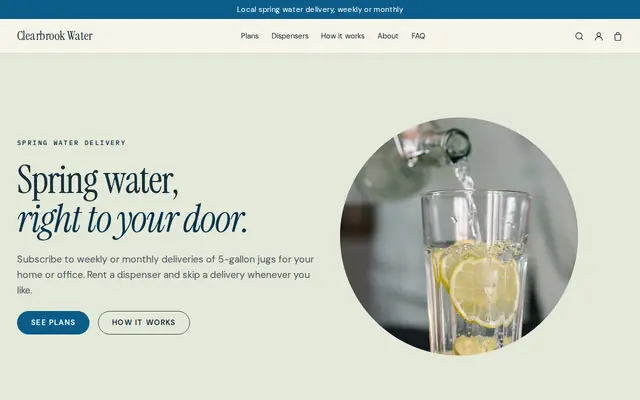
Made for Water delivery, Propane and fuel, Laundry pick-up
Clean and fresh for deliveries on a schedule.
Advice
Whatever you build it with, these are the things that turn visitors into customers.
Calls jump with the first heat wave and the first cold snap. Update your home page and your plan offer a few weeks before, not when the phone is already ringing.
In the US, anyone handling refrigerant needs EPA Section 608 certification, and in the UK gas work needs Gas Safe registration. Showing these, plus any NATE or MCS certification, answers what careful buyers ask.
Rebates and tax credits for heat pumps change often and depend on the customer. Link to the official program page instead of promising amounts, and say you’ll help with the paperwork if you do.
List what a tune-up checks and whether parts, filters or refrigerant are included. Plans that only promise “priority service” without explaining it are hard to compare.
Google Business Profile lets you publish short updates. A post when you open fall tune-ups, linking to that page on your website, reaches people already looking at your listing.
How it works
A sentence or two is enough: what you do, who it’s for and how people buy from you.
Cornerrr writes your pages, adds your products or services, and picks the colours, fonts and look. It takes about a minute.
Link a Stripe account, or create one in a few minutes. Your customers pay you directly.
Publish on your free Cornerrr web address, or use your own. Change anything later by asking.
Payments
Payments go through your own Stripe account, straight to you. Your customers see the methods you turn on in Stripe that work for their country and currency.
Selling in Europe or the US? United States, United Kingdom, Germany, France, Netherlands, Ireland and every country we cover.
Pricing
Build and preview for free, no card needed. Every paid plan starts with a 14-day free trial, and Cornerrr adds no transaction fees.
Build your website and try everything before you go live.
$0free
Go live and start selling.
$19a month
Most popular
For growing businesses with subscriptions and deliveries.
$49a month
For several stores and bigger catalogues.
$99a month
Questions
On Cornerrr’s Growth plan, a maintenance plan is a subscription that Stripe bills yearly or monthly. Customers sign up and pay on your website and see the plan in their account, and you arrange their tune-ups with them.
Full system prices depend on home size, ductwork and equipment, so most companies quote after a visit. Tune-ups and diagnostic visits are easier to price up front, and that’s often where new customers start.
Your number and the hours you answer, the areas you cover after dark, any after-hours charge, and a few safe checks to try first. If they smell gas, tell them to leave the house and call the gas utility.
Short answers to questions customers already ask you: how often to change a filter, why a heat pump runs for hours in winter, what that rattling means. The blog is part of the Growth plan on Cornerrr.
No. You describe your business in your own words and Cornerrr builds the website. Afterwards you change things by clicking, or by asking the assistant in plain words.
Building and previewing your website is free, with no card needed. To go live and take payments, choose a plan from $19 a month. Every paid plan starts with a 14-day free trial; a card is needed to start it.
Describe your business and see your website in about a minute. It’s free until you go live.