Preview
Build your website and try everything before you go live.
$0free
Website builder for print shops
Describe what you print and who for, and Cornerrr builds a print shop website: standard products like business cards and flyers with prices and paper options, custom jobs on request, a file setup page and turnaround times customers can plan around.

What you get
Cornerrr writes every page from your description, then you change anything by clicking or by asking.
Business cards, flyers and postcards as products with quantity, paper weight and finish as options, each priced. A café owner orders 500 cards on a Sunday night without waiting for a quote.
Booklets, odd sizes, special papers, foiling and bulk runs are “price on request”. Customers send the quantity, deadline and specs in the form, and you quote from your Inbox.
Posters, banners, roll-ups and window graphics listed with sizes and materials, sold at set prices in standard sizes and quoted for anything else.
Programs, menus, place cards and invitations for weddings and events, quoted per order and planned back from the event date the customer gives you.
Trade, wholesale and B2B
What you offer without a price, and quote requests with the quantities and details you need.
Quantity, paper and finish as options, each combination with its own price and SKU. Customers see what 250 matte cards cost next to 1,000 gloss ones before they pay.
Each paid order sends you an email and appears in your Orders list, and each quote request lands in your Inbox. You reply by email to collect artwork and confirm the proof.
Set fixed rates for posting small orders and delivering big ones locally, with delivery estimates. Add a tracking number and the customer gets a shipping email with a tracking link.
Give schools, clubs or repeat business customers a discount code with a usage limit, dates and a minimum order, on any paid plan.
Ready-made themes
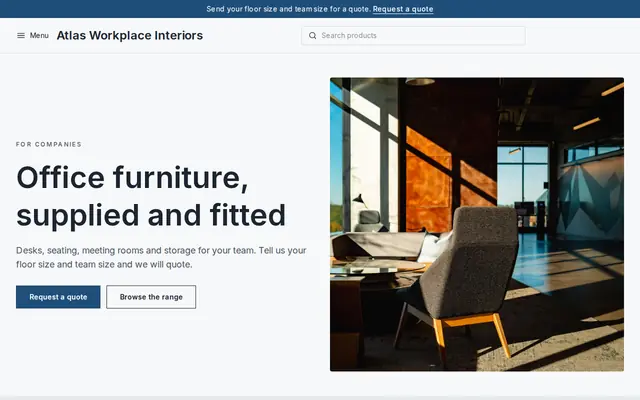
Made for Office suppliers, Fit-out companies, B2B services
Modern and confident for B2B services and fit-outs.
Advice
Whatever you build it with, these are the things that turn visitors into customers.
Bleed, safe margin, color mode, resolution and accepted file types: write them once on a File setup page and link to it from every product. Most reprints and delays start with a file that wasn’t set up for print.
Say how many working days each product takes and when the clock starts. “Three working days from proof approval” prevents more arguments than any policy page.
Photograph your paper stocks and finishes close up: matte, silk, uncoated, soft-touch, foil. Customers choose paper by feel, and a good close-up is the next best thing.
Say whether you send a digital proof, whether you check files or print exactly what is sent, and that colors on screen can differ from print. It sets expectations before anything goes on the press.
Online printers compete on price; you win on speed, advice and same-week jobs. Put your town in your page titles and offer rush jobs clearly, with the cut-off time.
How it works
A sentence or two is enough: what you do, who it’s for and how people buy from you.
Cornerrr writes your pages, adds your products or services, and picks the colours, fonts and look. It takes about a minute.
Link a Stripe account, or create one in a few minutes. Your customers pay you directly.
Publish on your free Cornerrr web address, or use your own. Change anything later by asking.
Payments
Payments go through your own Stripe account, straight to you. Your customers see the methods you turn on in Stripe that work for their country and currency.
Selling in Europe or the US? United States, United Kingdom, Germany, France, Netherlands, Ireland and every country we cover.
Pricing
Build and preview for free, no card needed. Every paid plan starts with a 14-day free trial, and Cornerrr adds no transaction fees.
Build your website and try everything before you go live.
$0free
Go live and start selling.
$19a month
Most popular
For growing businesses with subscriptions and deliveries.
$49a month
For several stores and bigger catalogues.
$99a month
Questions
Yes. Add business cards as a product with quantity, paper and finish as options, each with its price. Customers pay through Stripe Checkout and the order arrives by email and in your Orders list.
The website doesn’t take file uploads today. Say on your File setup page how to send files, for example by email or a file-sharing link, and confirm the proof by email.
Yes. Mark custom jobs “price on request” and the page shows a request form with a quantity field and a message box for size, paper and deadline. Requests land in your Inbox.
Yes, as an option on the product or as its own product, such as next working day, with its own price. Put the cut-off time on the page so nobody orders a rush job at midnight on a Friday.
No. You describe your business in your own words and Cornerrr builds the website. Afterwards you change things by clicking, or by asking the assistant in plain words.
Building and previewing your website is free, with no card needed. To go live and take payments, choose a plan from $19 a month. Every paid plan starts with a 14-day free trial; a card is needed to start it.
Describe your business and see your website in about a minute. It’s free until you go live.