Preview
Build your website and try everything before you go live.
$0free
Website builder for equipment rental companies
Describe the machines you rent and the area you serve, and Cornerrr builds an equipment rental website: a page per machine with specs and what’s included, rental requests with dates and job site that land in your Inbox, and online sales of consumables.
What you get
Cornerrr writes every page from your description, then you change anything by clicking or by asking.
Each machine as a product with photos, operating weight, dig depth or platform height, fuel type, the attachments that come with it and what it takes to tow. Renters pick the right size the first time.
Machines are “price on request”, so each page shows a request form. Customers send the dates, the job site and what the job is, and the request lands in your Inbox for you to check and confirm by email.
A Delivery page with the area you cover, how much notice you need and what the site needs for a drop-off: firm access, room for the truck and someone there to sign.
Diamond blades, grinding discs, PPE and wear parts sold online with prices and stock, so renters can order what the job will burn through.
Trade, wholesale and B2B
What you offer without a price, and quote requests with the quantities and details you need.
Each rental request arrives in your Inbox and by email with the machine it came from, the customer’s company, the job location, the quantity and their dates in the message. You check your fleet and confirm by email.
Ask the assistant to turn your spec notes into the same list on every machine page, add a new excavator to the fleet, or rewrite How renting works in plain words, then apply it.
Blades, PPE and parts are paid online through your own Stripe account, by card, Apple Pay, Google Pay and the local methods you turn on. Cornerrr adds no transaction fee.
Turn on tax ID collection and invoices for one-time orders, so contractors buying online get proper records, and let Stripe Tax work out sales tax or VAT.
Ready-made themes
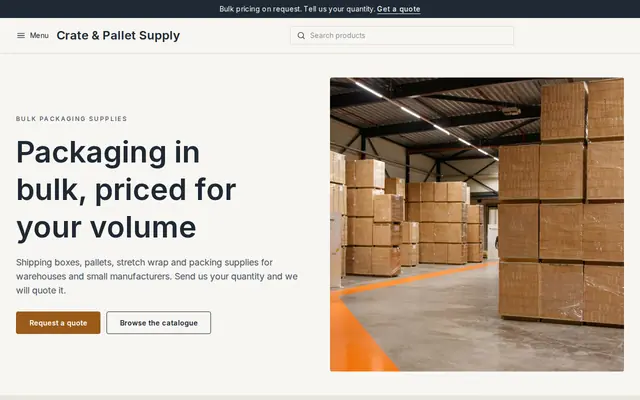
Made for Wholesalers, Packaging, Industrial supplies
Plain and efficient for wholesale and bulk orders.
Advice
Whatever you build it with, these are the things that turn visitors into customers.
ID, proof of insurance, a towing vehicle with the right hitch, or a trained operator where the law or your insurer requires one. Put the list on How renting works so nobody turns up without it.
Operating weight, overall width (will it fit through the side gate?), dig depth, lift height, platform capacity and power output. Renters who can check fit order the right machine and don’t swap it on day one.
What counts as a day, when the clock starts, the fuel policy, cleaning charges, damage cover and what happens if it rains. Put the short version on each machine page and the full version on its own page.
Many homeowners have never used a mini excavator. Short guides such as which compactor suits a patio base or what size generator runs an outdoor event bring in searches and turn them into requests.
Contractors often rent the day before they need a machine. Say on your request page how fast you reply and until what time, and ask for start date, end date and the job address up front.
How it works
A sentence or two is enough: what you do, who it’s for and how people buy from you.
Cornerrr writes your pages, adds your products or services, and picks the colours, fonts and look. It takes about a minute.
Link a Stripe account, or create one in a few minutes. Your customers pay you directly.
Publish on your free Cornerrr web address, or use your own. Change anything later by asking.
Payments
Payments go through your own Stripe account, straight to you. Your customers see the methods you turn on in Stripe that work for their country and currency.
Selling in Europe or the US? United States, United Kingdom, Germany, France, Netherlands, Ireland and every country we cover.
Pricing
Build and preview for free, no card needed. Every paid plan starts with a 14-day free trial, and Cornerrr adds no transaction fees.
Build your website and try everything before you go live.
$0free
Go live and start selling.
$19a month
Most popular
For growing businesses with subscriptions and deliveries.
$49a month
For several stores and bigger catalogues.
$99a month
Questions
Not with a calendar. Customers send a rental request with their dates, the machine and the job site, it lands in your Inbox and by email, and you confirm by email once you’ve checked your fleet.
Yes. Machines are usually marked “price on request” so the page shows a request form, and you can still write your day, week and month rates in the description so renters know what to expect.
Consumables and parts can be paid online. For rentals, most companies confirm the dates by email first and take payment the way they do today, because Cornerrr has no rental calendar or card holds.
Yes. Used machines can be products with a price and a cart button, or “price on request” if buyers usually want to see them first. Keep rental machines in their own collection so nobody confuses the two.
No. You describe your business in your own words and Cornerrr builds the website. Afterwards you change things by clicking, or by asking the assistant in plain words.
Building and previewing your website is free, with no card needed. To go live and take payments, choose a plan from $19 a month. Every paid plan starts with a 14-day free trial; a card is needed to start it.
Describe your business and see your website in about a minute. It’s free until you go live.